# Clusters
Guidance for configuring and operating Materialize clusters.
Clusters provide the compute resources for running dataflows in Materialize.
- Learn about [clusters](/fundamentals/concepts/clusters/).
- Follow the [operational guidelines](/clusters/operational-guidelines/).
- Speed up hydration with [autoscaling](/clusters/autoscaling/).
- Understand the [lifecycle of a cluster](/clusters/lifecycle-of-a-cluster/).
- Understand [system clusters](/clusters/system-clusters/).
---
## Autoscaling for hydration
> **Public Preview:** This feature is in public preview.
When you create an index, materialized view, or Kafka upsert source, or when a
cluster restarts, the cluster must
[hydrate](/fundamentals/concepts/hydration/) the affected
objects before they can serve results. Hydration reads the input data
and rebuilds in-memory state, and its speed scales with the cluster
[size](/sql/create-cluster/#available-sizes).
The `AUTO SCALING STRATEGY (ON HYDRATION)` option lets a cluster **automatically
provision an extra burst replica at the configured `HYDRATION SIZE` while it has
un-hydrated objects**. This speeds up hydration without manually scaling the
cluster up before hydration and back down afterward. The steady-size replicas
continue hydrating in parallel, and once one of them catches up with the burst,
the burst replica lingers for the `LINGER DURATION` and is then removed. The
burst replica is an ordinary cluster replica, billed only for the time it is
provisioned. See [Usage & billing](/materialize-cloud/billing/) for details.
`AUTO SCALING STRATEGY (ON HYDRATION)` is particularly useful for [blue/green
deployments](/manage/blue-green/), where a new cluster must hydrate before the
cutover. It is only available on **managed clusters**, and cannot be combined
with a cluster `SCHEDULE` other than the default `MANUAL`.
For example, the following cluster can provision a burst replica of size `800cc`:
```mzsql
CREATE CLUSTER fast_start (
SIZE = '100cc',
AUTO SCALING STRATEGY = (
ON HYDRATION (
HYDRATION SIZE = '800cc',
LINGER DURATION = '15s'
)
)
);
```
You can specify the following options:
Option | Description
-------|------------
`HYDRATION SIZE` | The [size](/sql/create-cluster/#available-sizes) of the burst replica provisioned while the cluster has un-hydrated objects. Must differ from the cluster's steady `SIZE`. Choose a larger size to speed up hydration.
`LINGER DURATION` | Optional. How long the burst replica lingers after a steady-size replica catches up, before it is removed. Default: `0s`.
Provisioning the burst replica requires enough compute capacity to run it. In
Materialize Self-Managed, this means your Kubernetes cluster must have enough
spare resources (for example, available nodes) to schedule the burst replica.
The burst is best-effort and never blocks the cluster: if the burst replica
cannot be provisioned, the steady-size replicas still come up and hydrate as
usual, as long as there are enough resources for them.
To remove the autoscaling strategy from a cluster, use `ALTER CLUSTER ... RESET
(AUTO SCALING STRATEGY)` or set an empty strategy with `AUTO SCALING STRATEGY =
()`.
You can inspect the configured strategy and any in-flight burst in the
[`mz_internal.mz_cluster_auto_scaling_strategies`](/sql/system-catalog/mz_internal/#mz_cluster_auto_scaling_strategies)
catalog view.
## Configure autoscaling on an existing cluster
You can also add, change, or remove the strategy after the cluster already
exists:
```mzsql
ALTER CLUSTER fast_start SET (
AUTO SCALING STRATEGY = (
ON HYDRATION (HYDRATION SIZE = '800cc', LINGER DURATION = '15s')
)
);
```
```mzsql
ALTER CLUSTER fast_start RESET (AUTO SCALING STRATEGY);
```
For the full option reference, see the `AUTO SCALING STRATEGY` option on
[`CREATE CLUSTER`](/sql/create-cluster/#autoscaling) and
[`ALTER CLUSTER`](/sql/alter-cluster/#speed-up-hydration-by-autoscaling-to-a-larger-size).
## Monitor an autoscaling event
To check whether a burst is currently running and what it's configured to do,
query
[`mz_internal.mz_cluster_auto_scaling_strategies`](/sql/system-catalog/mz_internal/#mz_cluster_auto_scaling_strategies):
```mzsql
SELECT
c.name AS cluster,
s.strategy->'on_hydration'->>'hydration_size' AS hydration_size,
s.state->'burst'->>'burst_size' AS inflight_burst_size
FROM mz_internal.mz_cluster_auto_scaling_strategies AS s
JOIN mz_clusters AS c ON c.id = s.cluster_id;
```
`inflight_burst_size` is `NULL` when no burst is running, and reports the burst
replica's size while one is up. [`SHOW CLUSTERS`](/sql/show-clusters/) also
summarizes an in-flight burst in its `activity` column, and lists the burst
replica itself, at its larger size, in `replicas`:
```nofmt
name | replicas | activity
-------------+------------------------+-----------------------------
fast_start | r1 (100cc), r2 (800cc) | hydration burst at 800cc
```
To check whether the objects driving the burst have finished hydrating on the
steady-size replicas, query
[`mz_internal.mz_hydration_statuses`](/sql/system-catalog/mz_internal/#mz_hydration_statuses)
for the cluster's steady-size replica IDs. Once every object is hydrated on a
steady-size replica, the burst replica lingers for the configured `LINGER
DURATION` and is then removed.
The [audit log](/sql/system-catalog/mz_catalog/#mz_audit_events) records when a
burst replica is created and dropped, so you can look back at past autoscaling
events after the fact.
## If the steady-size replica never hydrates
The burst replica has no maximum lifetime: if a steady-size replica never
catches up (for example, it's undersized and runs out of memory during
hydration), the burst replica keeps serving indefinitely at the configured
`HYDRATION SIZE`, billed for as long as it runs. This is deliberate: the burst
replica may be the only thing keeping the cluster able to serve results, so
Materialize does not tear it down just because it has been up a while.
If you find yourself in this situation, [resize the cluster](/sql/alter-cluster/#resizing)
to a `SIZE` that can hydrate the objects at steady state. The burst replica
keeps serving throughout the resize, so there's no gap in availability while
you find the right size.
## If capacity is unavailable
Provisioning the burst replica requires enough compute capacity to run it. In
**Materialize Self-Managed**, this means your Kubernetes cluster needs enough
spare resources (for example, available nodes) to schedule the burst replica's
pods. If it doesn't, Materialize keeps retrying automatically; no action is
required on your part, though the burst can't speed up hydration until
capacity frees up.
Either way, the burst is best-effort and never blocks the cluster: the
steady-size replicas come up and hydrate as usual, independently of whether the
burst replica could be provisioned, as long as there are enough resources for
them. If you plan to lean on autoscaling for hydration in a capacity-
constrained Self-Managed deployment, make sure your node pools have enough
spare capacity for the burst replicas you expect to run; see [Resize node
pools](/self-managed-deployments/deployment-guidelines/resize-node-pools/).
## Limitations
- Autoscaling for hydration only speeds up the initial hydration of indexes,
materialized views, and Kafka upsert sources. It does not help with ongoing
freshness or staleness, and it has no effect on
[single-replica sources](/fundamentals/concepts/hydration/#objects-and-hydration)
(PostgreSQL, MySQL, and SQL Server sources), which stay pinned to one replica
regardless of the strategy.
- `AUTO SCALING STRATEGY` cannot be combined with a `SCHEDULE` other than the
default `MANUAL`, and is only available on managed clusters.
- Autoscaling for hydration does not apply to the new generation during a
Materialize Self-Managed version upgrade. Until it's promoted, the new
generation runs read-only and can't provision a burst replica, so it
hydrates only at its configured steady `SIZE`. See [Rollout
strategies](/self-managed-deployments/upgrading/#rollout-strategies).
## Related pages
- [Hydration](/fundamentals/concepts/hydration/)
- [`CREATE CLUSTER`](/sql/create-cluster/#autoscaling)
- [`ALTER CLUSTER`](/sql/alter-cluster/#speed-up-hydration-by-autoscaling-to-a-larger-size)
- [`mz_internal.mz_cluster_auto_scaling_strategies`](/sql/system-catalog/mz_internal/#mz_cluster_auto_scaling_strategies)
- [Blue/green deployments](/developer-tools/dbt/blue-green-deployments/)
---
## M.1 to cc size mapping
The following table provides a general mapping between cc and M.1 cluster sizes:
**cc to M.1:**
| cc Size | M.1 Size |
| --- | --- |
| 25cc | M.1-nano |
| 50cc | M.1-nano |
| 100cc | M.1-micro |
| 200cc | M.1-xsmall |
| 300cc | M.1-small |
| 400cc | M.1-small |
| 600cc | M.1-medium |
| 800cc | M.1-large or M.1-medium |
| 1200cc | M.1-1.5xlarge |
| 1600cc | M.1-2xlarge or M.1-1.5xlarge |
| 3200cc | M.1-8xlarge or M.1-4xlarge or M.1-3xlarge |
| 6400cc | M.1-16xlarge |
| 128C | M.1-32xlarge |
| 256C | M.1-64xlarge |
| 512C | M.1-128xlarge |
**M.1 to cc:**
| M.1 Size | cc Size |
| --- | --- |
| M.1-nano | 25cc |
| M.1-nano | 50cc |
| M.1-micro | 100cc |
| M.1-xsmall | 200cc |
| M.1-small | 300cc or 400cc |
| M.1-medium | 600cc or 800cc |
| M.1-large | 800cc |
| M.1-1.5xlarge | 1200cc or 1600cc |
| M.1-2xlarge | 1600cc |
| M.1-3xlarge | 3200cc |
| M.1-4xlarge | 3200cc |
| M.1-8xlarge | 3200cc |
| M.1-16xlarge | 6400cc |
| M.1-32xlarge | 128C |
| M.1-64xlarge | 256C |
| M.1-128xlarge | 512C |
Some sizes have multiple mappings. When converting between cc and M.1 sizing, we
recommend choosing the larger mapping size first.
---
## Operational guidelines
The following provides some general guidelines for production.
## Clusters
### Production clusters for production workloads only
Use production cluster(s) for production workloads only. That is, avoid using
production cluster(s) to run development workloads or non-production tasks.
### Three-tier architecture
In production, use a three-tier architecture, if feasible.
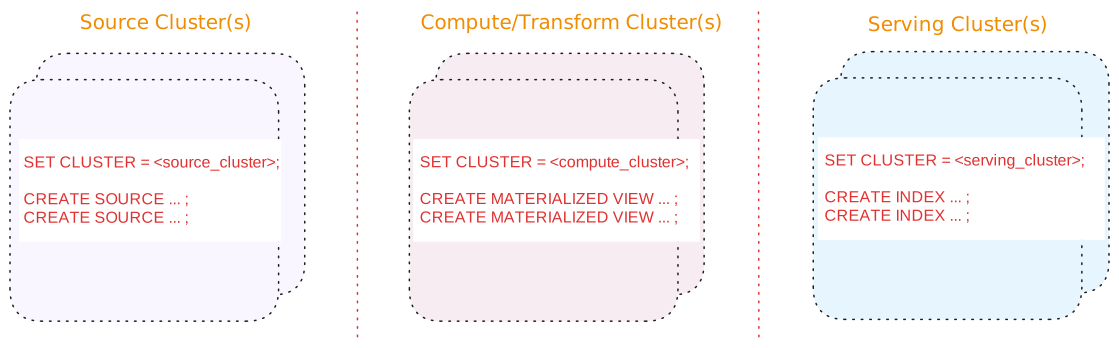
A three-tier architecture consists of:
| Tier | Description |
| --- | --- |
| Source cluster(s) | A dedicated cluster(s) for sources.
In addition, for upsert sources:
-
Consider separating upsert sources from your other sources. Upsert sources have higher resource requirements (since, for upsert sources, Materialize maintains each key and associated last value for the key as well as to perform deduplication). As such, if possible, use a separate source cluster for upsert sources.
-
Consider using a larger cluster size during snapshotting for upsert sources. Once the snapshotting operation is complete, you can downsize the cluster to align with the steady-state ingestion.
|
| Compute/Transform cluster(s) | A dedicated cluster(s) for compute/transformation:
-
Materialized views to persist, in durable storage, the results that will be served. Results of materialized views are available across all clusters.
> **Tip:** If you are using stacked views (i.e., views whose definition depends > on other views) to reduce SQL complexity, generally, only the topmost > view (i.e., the view whose results will be served) should be a > materialized view. The underlying views that do not serve results do not > need to be materialized. -
Indexes, only as needed, to make transformation fast (such as possibly indexes on join keys).
> **Tip:** From the compute/transformation clusters, do not create indexes on the > materialized views for the purposes of serving the view results. > Instead, use the [serving cluster(s)](#tier-serving-clusters) when > creating indexes to serve the results.
|
| Serving cluster(s) | A dedicated cluster(s) for serving queries, including indexes on the materialized views. Indexes are local to the cluster in which they are created. |
Benefits of a three-tier architecture include:
#### Alternatives
If a three-tier architecture is infeasible or unnecessary due to low volume or a
non-production setup, a two cluster or a single cluster architecture may
suffice.
See [Appendix: Alternative cluster
architectures](/clusters/operational-guidelines/appendix-alternative-cluster-architectures/) for details.
## Sources
### Scheduling
If possible, schedule creating new sources during off-peak hours to mitigate
the impact of snapshotting on both the upstream system and the Materialize
cluster.
### Separate cluster(s) for sources
In production, if possible, use a dedicated cluster for
[sources](/fundamentals/concepts/sources/); i.e., avoid putting sources on the same cluster
that hosts compute objects, sinks, and/or serves queries.
In addition, for upsert sources:
- Consider separating upsert sources from your other sources. Upsert sources
have higher resource requirements (since, for upsert sources, Materialize
maintains each key and associated last value for the key as well as to perform
deduplication). As such, if possible, use a separate source cluster for upsert
sources.
- Consider using a larger cluster size during snapshotting for upsert sources.
Once the snapshotting operation is complete, you can downsize the cluster to
align with the steady-state ingestion.
See also [Production cluster architecture](#three-tier-architecture).
## Sinks
### Separate sinks from sources
To allow for [blue/green deployment](/developer-tools/dbt/blue-green-deployments/), avoid
putting sinks on the same cluster that hosts sources .
See also [Cluster architecture](#three-tier-architecture).
## Snapshotting considerations
For upsert sources, snapshotting is a resource-intensive operation that can require a significant amount of CPU and memory.
## Hydration considerations
When sizing a cluster, budget for hydration memory on top of the steady-state
cost. The table below summarizes, per object type, when each object hydrates and
the memory it uses. For more on hydration, including strategies to reduce its
impact, see [Hydration](/fundamentals/concepts/hydration/).
| Object | Hydration behavior |
| --- | --- |
| Materialized views | - **When**: Hydrates on creation and on every replica (re)start or cluster resize. - **What**: Rebuilds the dataflow's operator state: the arrangements that joins, aggregations, and similar operators keep to update results incrementally. Note: A materialized view's result lives in durable storage, so it rebuilds only this maintenance state, not the result. - **Memory Use**: Scales with the view's definition, which it holds at steady state, plus a transient output buffer up to twice the output size: the current output plus a read-back of the previously persisted output. On first creation, since there is no previous output, the buffer is a single output size. |
| Indexes | - **When**: Hydrates on creation and on every replica (re)start or cluster resize. - **What**: Rebuilds the arranged (indexed) data it keeps in memory to serve reads, plus any operator arrangements its dataflow maintains (for joins, aggregations, and similar). - **Memory Use**: Its memory is proportional to the indexed data plus those arrangements, and is held for as long as the index exists. |
| Kafka upsert sources and associated read-only tables/subsources | - **When**: On replica (re)start or cluster resize. These sources do not hydrate on creation; instead, on creation, their indexes are built as part of [snapshotting](/fundamentals/concepts/snapshotting/). - **What**: Rebuilds the table's or subsource's internal upsert index from storage. - **Memory Use**: The index holds the latest value per key, so its memory scales with the source's key space. On standard cluster sizes it can spill to disk when the key space exceeds memory. |
| Append-only Kafka sources and CDC database sources (PostgreSQL, MySQL, SQL Server), and their read-only tables/subsources | - **When**: On replica (re)start or cluster resize, marked hydrated as soon as the dataflow starts. - **What**: Effectively nothing. These sources keep no internal index to rebuild and resume from their persisted position, so hydration is a no-op. - **Memory Use**: Negligible, since there is no index to hold. |
| Webhook sources | Not applicable. A webhook source is not maintained by a dataflow. It receives data pushed over HTTP and writes the data directly to storage, so it does not hydrate. |
| Sinks | - **When**: If created `WITH (SNAPSHOT = true)` (the default), hydrates: - On creation, when the sink first emits its input snapshot. - On a replica (re)start, but only if the sink restarted before recording any progress: it then re-reads the whole input snapshot, and any data already written to the external system is discarded, but the memory cost still occurs. An established sink resumes from its recorded progress without re-reading the snapshot. - **What**: Loads a full copy of its input snapshot into the arrangement that feeds the sink before it can emit. - **Memory Use**: Peaks at roughly a full copy of the input snapshot, then decreases as the snapshot is written out. Negligible on a restart of an established sink. At steady state, a sink retains little in memory. |
| Subscriptions | - **When**: On creation and, while it remains active, on every replica (re)start: the dataflow is re-installed on the (re)started replica and the subscription resumes. A subscription that targets a specific replica instead ends with an error when that replica restarts. A subscription ends with its session and is not reported in `mz_hydration_statuses`. - **What**: Rebuilds the dataflow when it starts. - **Memory Use**: Scales with the dataflow, held while the subscription runs. |
## Role-based access control (RBAC)
**Cloud:**
### Cloud
##### Follow the principle of least privilege
Role-based access control in Materialize should follow the principle of
least privilege. Grant only the minimum access necessary for users and
service accounts to perform their duties.
##### Restrict the assignment of **Organization Admin** role
{{% include-headless "/headless/rbac-cloud/org-admin-recommendation" %}}
##### Restrict the granting of `CREATEROLE` privilege
{{% include-headless "/headless/rbac-cloud/createrole-consideration" %}}
##### Use Reusable Roles for Privilege Assignment
{{% include-headless "/headless/rbac-cloud/use-resusable-roles" %}}
See also [Manage database roles](/security/access-control/manage-roles/).
##### Audit for unused roles and privileges.
{{% include-headless "/headless/rbac-cloud/audit-remove-roles" %}}
See also [Show roles in
system](/security/cloud/access-control/manage-roles/#show-roles-in-system) and [Drop
a role](/security/cloud/access-control/manage-roles/#drop-a-role) for more
information.
**Self-Managed:**
### Self-Managed
##### Follow the principle of least privilege
Role-based access control in Materialize should follow the principle of
least privilege. Grant only the minimum access necessary for users and
service accounts to perform their duties.
##### Restrict the granting of `CREATEROLE` privilege
{{% include-headless "/headless/rbac-sm/createrole-consideration" %}}
##### Use Reusable Roles for Privilege Assignment
{{% include-headless "/headless/rbac-sm/use-resusable-roles" %}}
See also [Manage database roles](/security/self-managed/access-control/manage-roles/).
##### Audit for unused roles and privileges.
{{% include-headless "/headless/rbac-sm/audit-remove-roles" %}}
See also [Show roles in
system](/security/self-managed/access-control/manage-roles/#show-roles-in-system)
and [Drop a
role](/security/self-managed/access-control/manage-roles/#drop-a-role) for
more information.
---
## System clusters
## Overview
When you enable a Materialize region, various [system
clusters](/sql/system-clusters/) are pre-installed to improve the user
experience as well as support system administration tasks.
### `quickstart` cluster
A cluster named `quickstart` with a size of `25cc` and a replication factor of
`1` will be pre-installed in every environment. You can modify or drop this
cluster at any time.
> **Note:** The default value for the `cluster` session parameter is `quickstart`.
> This cluster functions as a default option, pre-created for your convenience.
> It allows you to quickly start running queries without needing to configure a cluster first.
> If the `quickstart` cluster is dropped, you must run [`SET cluster`](/sql/select/#ad-hoc-queries)
> to choose a valid cluster in order to run `SELECT` queries. A _superuser_ (i.e. `Organization Admin`)
> can also run [`ALTER SYSTEM SET cluster`](/sql/alter-system-set) to change the
> default value.
### `mz_catalog_server` system cluster
A system cluster named `mz_catalog_server` will be pre-installed in every
environment. This cluster has several indexes installed to speed up `SHOW`
commands and queries using the system catalog.
To take advantage of these indexes, Materialize will automatically re-route
`SHOW` commands and queries using system catalog objects to the
`mz_catalog_server` system cluster. You can disable this behavior in
your session via the `auto_route_catalog_queries`
[configuration parameter](/sql/show/#other-configuration-parameters).
The following characteristics apply to the `mz_catalog_server` cluster:
* You are **not billed** for this cluster.
* You cannot create objects in this cluster.
* You cannot drop this cluster.
* You can run `SELECT` or `SUBSCRIBE` queries in this cluster as long
as you only reference objects in the [system catalog](/sql/system-catalog/).
### `mz_probe` system cluster
A system cluster named `mz_probe` will be pre-installed in every environment.
This cluster is used for internal uptime monitoring.
The following characteristics apply to the `mz_probe` cluster:
* You are **not billed** for this cluster.
* You cannot create objects in this cluster.
* You cannot drop this cluster.
* You cannot run `SELECT` or `SUBSCRIBE` queries in this cluster.
### `mz_support` system cluster
A system cluster named `mz_support` will be pre-installed in every environment.
This cluster is used for internal support tasks.
The following characteristics apply to the `mz_support` cluster:
* You are **not billed** for this cluster.
* You cannot create objects in this cluster.
* You cannot drop this cluster.
* You cannot run `SELECT` or `SUBSCRIBE` queries in this cluster.
### `mz_system` system cluster
A system cluster named `mz_system` will be pre-installed in every environment.
This cluster is used for internal system jobs.
The following characteristics apply to the `mz_system` cluster:
* You are **not billed** for this cluster.
* You cannot create objects in this cluster.
* You cannot drop this cluster.
* You cannot run `SELECT` or `SUBSCRIBE` queries in this cluster.
## Related pages
- [`CREATE CLUSTER`](/sql/create-cluster)
- [`SHOW CLUSTER`](/sql/show-clusters)
- [`DROP CLUSTER`](/sql/drop-cluster)
---
## Understand the lifecycle of a cluster
Whenever a cluster starts running a workload, it moves through a sequence of
stages before its results are fully up to date. Knowing which stage a cluster
is in tells you whether it is making progress or is stuck.
A cluster enters this sequence when you create it,
[resize](/sql/alter-cluster/#resizing) it, or raise its [replication
factor](/sql/alter-cluster/#replication-factor), and whenever a replica
restarts, including during Materialize Cloud's routine maintenance and after an
out-of-memory event.
## Stages
| Stage | What is happening | Where to look |
|-------------------------------|------------------------------------------------------------------|------------------------------------------|
| [Provisioning](#provisioning) | Replicas are scheduled and brought online. | `mz_cluster_replica_statuses` |
| [Hydrating](#hydrating) | Each replica rebuilds its in-memory state from the storage layer. | `mz_hydration_statuses` |
| [Catching up](#catching-up) | The cluster works through the backlog of updates, so lag falls. | `mz_wallclock_global_lag_recent_history` |
| [Steady state](#steady-state) | The cluster keeps up with its inputs and lag holds low. | `mz_wallclock_global_lag_recent_history` |
No single column reports these stages. A replica's `status` is only `online` or
`offline`, so it answers the provisioning question and nothing else. Hydration
and lag are separate signals, and you need both: a hydrated object has
processed the snapshot of its inputs, but not the updates that arrived while it
was doing so, and a low lag on an unhydrated object does not mean its results
are available.
Two states interrupt the sequence: a cluster with [no replicas](#no-compute)
never leaves provisioning, and a replica that goes [offline](#offline-replicas)
restarts and re-enters the sequence from the top.
The queries below monitor this cluster. Substitute your own object names.
```mzsql
CREATE CLUSTER lifecycle_demo SIZE '25cc';
CREATE SOURCE auction_load IN CLUSTER lifecycle_demo
FROM LOAD GENERATOR AUCTION (TICK INTERVAL '1s') FOR ALL TABLES;
CREATE MATERIALIZED VIEW bids_by_auction IN CLUSTER lifecycle_demo AS
SELECT auction_id, count(*) AS bids, max(amount) AS max_bid
FROM bids
GROUP BY auction_id;
CREATE INDEX bids_by_auction_idx IN CLUSTER lifecycle_demo
ON bids_by_auction (auction_id);
```
## Provisioning
Replicas are scheduled and brought online. To monitor progress, check that each
replica reports `online` in
[`mz_cluster_replica_statuses`](/sql/system-catalog/mz_internal/#mz_cluster_replica_statuses):
```mzsql
SELECT c.name AS cluster, r.name AS replica, r.size, st.status, st.reason
FROM mz_internal.mz_cluster_replica_statuses st
JOIN mz_catalog.mz_cluster_replicas r ON r.id = st.replica_id
JOIN mz_catalog.mz_clusters c ON c.id = r.cluster_id
WHERE c.name = 'lifecycle_demo'
ORDER BY r.name;
```
```none
cluster | replica | size | status | reason
----------------+---------+------+--------+--------
lifecycle_demo | r1 | 25cc | online |
(1 row)
```
`status` is `online` or `offline`. `reason` is `NULL` while a replica is
online, and otherwise reports `initializing` or `oom-killed`.
A [resize](/sql/alter-cluster/#resizing) passes through this stage without
downtime: Materialize provisions replicas at the target size and hydrates them
before retiring the old ones, so this query reports replicas at both sizes
until the cutover. The new replicas are new objects with new IDs and names, so
a `r1` that becomes `r2` is a resize, not a restart. See [Monitoring a
resize](/sql/alter-cluster/#monitoring-a-resize).
### No compute
A cluster with a [replication factor](/sql/alter-cluster/#replication-factor)
of `0` has no replicas, so it never leaves provisioning. The query above
returns no rows at all rather than an `offline` status, which is worth knowing
if you alert on it. Queries routed to the cluster fail immediately:
```none
ERROR: CLUSTER "lifecycle_demo" has no replicas available to service request
HINT: Use ALTER CLUSTER to adjust the replication factor of the cluster.
```
A query run from a *different* cluster against an object maintained by this one
does not error. It blocks until the object's frontier advances, which it never
will.
To find clusters in this state:
```mzsql
SELECT name, replication_factor
FROM mz_catalog.mz_clusters
WHERE replication_factor = 0;
```
Scaling a cluster to zero between scheduled runs saves compute, but it is not
free: its objects hold back compaction of their inputs, so the cluster faces
more work, and a higher memory peak, when it comes back. Prefer dropping and
recreating such clusters over parking them at zero for long stretches.
## Hydrating
Each replica reconstructs its in-memory state by reading from Materialize's
storage layer (see [hydration](/fundamentals/concepts/hydration/)).
[`mz_hydration_statuses`](/sql/system-catalog/mz_internal/#mz_hydration_statuses)
reports the flag for every object a cluster maintains, sources and sinks
included:
```mzsql
SELECT o.name AS object, o.type, h.hydrated
FROM mz_internal.mz_hydration_statuses h
JOIN mz_objects o ON o.id = h.object_id
JOIN mz_catalog.mz_cluster_replicas r ON r.id = h.replica_id
JOIN mz_catalog.mz_clusters c ON c.id = r.cluster_id
WHERE c.name = 'lifecycle_demo' AND o.id LIKE 'u%'
ORDER BY o.name;
```
```none
object | type | hydrated
---------------------+-------------------+----------
accounts | source | t
auction_load | source | t
auctions | source | t
bids | source | t
bids_by_auction | materialized-view | t
bids_by_auction_idx | index | t
organizations | source | t
users | source | t
(8 rows)
```
The `o.id LIKE 'u%'` filter excludes the built-in introspection indexes that
every replica carries. The join to `mz_cluster_replicas` is load-bearing:
`mz_hydration_statuses` keeps rows for replicas that no longer exist, and
without the join a retired replica's stale `hydrated` values contradict the
live ones.
Sources hydrate more slowly than indexes and materialized views, often by a
minute or more on a fresh replica, so an all-object table like the one above
reads mixed for a while. To narrow the view to indexes and materialized views,
and to see how long each took,
[`mz_compute_hydration_statuses`](/sql/system-catalog/mz_internal/#mz_compute_hydration_statuses)
adds a `hydration_time` column:
```mzsql
SELECT o.name AS object, o.type, r.name AS replica, ch.hydrated, ch.hydration_time
FROM mz_internal.mz_compute_hydration_statuses ch
JOIN mz_objects o ON o.id = ch.object_id
JOIN mz_catalog.mz_cluster_replicas r ON r.id = ch.replica_id
JOIN mz_catalog.mz_clusters c ON c.id = r.cluster_id
WHERE c.name = 'lifecycle_demo' AND o.id LIKE 'u%'
ORDER BY o.name;
```
```none
object | type | replica | hydrated | hydration_time
---------------------+-------------------+---------+----------+-----------------
bids_by_auction | materialized-view | r1 | t | 00:00:00.00011
bids_by_auction_idx | index | r1 | t | 00:00:00.000019
(2 rows)
```
Judge a replica by its objects collectively rather than one at a time. An
object that finishes early reports a freshness number while its neighbours are
still hydrating and competing for CPU, so that number looks bad and alerting on
it produces false positives. Treat a replica as ready only once every object on
it is hydrated:
```mzsql
SELECT r.name AS replica, bool_and(h.hydrated) AS replica_hydrated
FROM mz_internal.mz_hydration_statuses h
JOIN mz_objects o ON o.id = h.object_id
JOIN mz_catalog.mz_cluster_replicas r ON r.id = h.replica_id
JOIN mz_catalog.mz_clusters c ON c.id = r.cluster_id
WHERE c.name = 'lifecycle_demo' AND o.id LIKE 'u%'
GROUP BY r.name;
```
A cluster with no replicas returns no rows here, not `false`.
Hydration is per replica, so adding a replica or resizing a cluster hydrates
only the new replicas while the existing ones keep serving. It is also the
memory peak of a cluster's life, and that peak is higher than steady-state
usage, so a cluster that runs comfortably for weeks can still fail to come back
after a restart. Size clusters against the peak rather than the steady state,
and consider [autoscaling](/clusters/autoscaling/) to a larger size for the
duration.
## Catching up
Once hydrated, the cluster processes the backlog of updates that accumulated
while it was unavailable, so its lag starts high and comes down.
[`mz_wallclock_global_lag_recent_history`](/sql/system-catalog/mz_internal/#mz_wallclock_global_lag_recent_history)
records how far each object trails wallclock time, binned by minute over the
last 24 hours:
```mzsql
SELECT o.name AS object, w.occurred_at, w.lag
FROM mz_internal.mz_wallclock_global_lag_recent_history w
JOIN mz_objects o ON o.id = w.object_id
WHERE o.name = 'bids_by_auction'
ORDER BY w.occurred_at DESC
LIMIT 8;
```
```none
object | occurred_at | lag
-----------------+------------------------+----------
bids_by_auction | 2026-09-15 17:33:00+00 | 00:00:01
bids_by_auction | 2026-09-15 17:32:00+00 | 00:00:01
bids_by_auction | 2026-09-15 17:31:00+00 | 00:00:01
bids_by_auction | 2026-09-15 17:30:00+00 | 00:00:01
bids_by_auction | 2026-09-15 17:29:00+00 | 00:00:01
bids_by_auction | 2026-09-15 17:28:00+00 | 00:01:42
bids_by_auction | 2026-09-15 17:27:00+00 | 00:00:42
bids_by_auction | 2026-09-15 17:26:00+00 | 00:00:01
(8 rows)
```
The cluster lost its replica just after 17:26. Lag climbs to 42 seconds, then
to 1 minute 42 seconds, then drops back to a second once the replacement
replica hydrates and works through the backlog. That shape, a climb followed by
a return to baseline, is what catching up looks like.
## Steady state
The cluster has caught up and its lag holds low and roughly constant, typically
a few seconds, as in the rows from 17:29 onward above. A lag that instead
climbs steadily, at about one minute per minute, means the cluster has stopped
making progress.
To attribute lag to a specific input,
[`mz_materialization_lag`](/sql/system-catalog/mz_internal/#mz_materialization_lag)
reports each object's distance from its direct inputs and from the sources and
tables at the root of its dependency graph:
```mzsql
SELECT o.name AS object, l.local_lag, l.global_lag,
si.name AS slowest_local_input, sg.name AS slowest_global_input
FROM mz_internal.mz_materialization_lag l
JOIN mz_objects o ON o.id = l.object_id
JOIN mz_objects si ON si.id = l.slowest_local_input_id
JOIN mz_objects sg ON sg.id = l.slowest_global_input_id
WHERE o.name IN ('bids_by_auction', 'bids_by_auction_idx')
ORDER BY o.name;
```
```none
object | local_lag | global_lag | slowest_local_input | slowest_global_input
---------------------+-----------+------------+---------------------+----------------------
bids_by_auction | 00:00:00 | 00:00:00 | bids | bids
bids_by_auction_idx | 00:00:00 | 00:00:00 | bids_by_auction | bids
(2 rows)
```
The index trails its direct input, the materialized view, and the view trails
the `bids` source, which is the root input for both.
> **Note:** These lags are measured against inputs, not against wallclock time. When a
> whole cluster stalls, the objects on it stall together and this query keeps
> reporting `00:00:00`. Use it to find *which* input a lagging object is waiting
> on, and wallclock lag to decide whether the object is lagging at all.
See [Troubleshooting freshness](/transform-data/freshness-troubleshooting/) to
diagnose a cluster that is not progressing, and [Monitor
freshness](/transform-data/monitor-freshness/) to track lag over time.
## Offline replicas
A replica that becomes unavailable reports `offline`, then restarts and
re-enters the lifecycle at [provisioning](#provisioning), rehydrating
everything it hosts. The cluster's lag grows until it catches up again.
A point-in-time status misses a replica that died and recovered between two
readings, so read
[`mz_cluster_replica_status_history`](/sql/system-catalog/mz_internal/#mz_cluster_replica_status_history)
rather than polling the current status:
```mzsql
SELECT h.replica_id, rh.replica_name, h.status, h.reason, h.occurred_at
FROM mz_internal.mz_cluster_replica_status_history h
JOIN mz_internal.mz_cluster_replica_history rh ON rh.replica_id = h.replica_id
WHERE rh.cluster_name = 'lifecycle_demo'
ORDER BY h.occurred_at DESC
LIMIT 20;
```
Resolve replica names through
[`mz_cluster_replica_history`](/sql/system-catalog/mz_internal/#mz_cluster_replica_history),
not `mz_cluster_replicas`. A replica that was retired or replaced is gone from
`mz_cluster_replicas`, so joining against it drops exactly the events a history
query is for.
Reading the history:
- A single `offline` followed by `online` on the same `replica_id` is a
restart, and is routine.
- The same pair on a *new* `replica_id` is a replica being created. A resize or
a blue/green swap changes which replicas back a cluster, so key on
`replica_id`, not on the cluster or replica name.
- A repeating `offline` with reason `oom-killed` is a crash loop: the replica
is too small for its workload, and each restart triggers a rehydration that
exhausts memory again. See [Check for OOM crash
loops](/transform-data/freshness-troubleshooting/#check-for-oom-crash-loops).
- `reason` is best-effort and is sometimes empty even for an out-of-memory
kill, so treat repeated restarts as the signal rather than the reason string.
> **Note:** Sources on the cluster go through an additional
> [snapshotting](/fundamentals/concepts/snapshotting/) step the first time they
> run, reading the initial state of the upstream system before the stages above
> apply. See [Understand the lifecycle of a
> source](/ingest-data/lifecycle-of-a-source/).
## Related pages
- [Clusters](/fundamentals/concepts/clusters/)
- [Hydration](/fundamentals/concepts/hydration/)
- [Autoscaling](/clusters/autoscaling/)
- [Troubleshooting freshness](/transform-data/freshness-troubleshooting/)
- [Understand the lifecycle of a source](/ingest-data/lifecycle-of-a-source/)