# Clusters
Guidance for configuring and operating Materialize clusters.
Clusters provide the compute resources for running dataflows in Materialize.
- Learn about [clusters](/fundamentals/concepts/clusters/).
- Follow the [operational guidelines](/clusters/operational-guidelines/).
- [Optimize hydration requirements](/clusters/optimize-hydration-requirements/).
- Understand [system clusters](/clusters/system-clusters/).
---
## M.1 to cc size mapping
The following table provides a general mapping between cc and M.1 cluster sizes:
**cc to M.1:**
| cc Size | M.1 Size |
| --- | --- |
| 25cc | M.1-nano |
| 50cc | M.1-nano |
| 100cc | M.1-micro |
| 200cc | M.1-xsmall |
| 300cc | M.1-small |
| 400cc | M.1-small |
| 600cc | M.1-medium |
| 800cc | M.1-large or M.1-medium |
| 1200cc | M.1-1.5xlarge |
| 1600cc | M.1-2xlarge or M.1-1.5xlarge |
| 3200cc | M.1-8xlarge or M.1-4xlarge or M.1-3xlarge |
| 6400cc | M.1-16xlarge |
| 128C | M.1-32xlarge |
| 256C | M.1-64xlarge |
| 512C | M.1-128xlarge |
**M.1 to cc:**
| M.1 Size | cc Size |
| --- | --- |
| M.1-nano | 25cc |
| M.1-nano | 50cc |
| M.1-micro | 100cc |
| M.1-xsmall | 200cc |
| M.1-small | 300cc or 400cc |
| M.1-medium | 600cc or 800cc |
| M.1-large | 800cc |
| M.1-1.5xlarge | 1200cc or 1600cc |
| M.1-2xlarge | 1600cc |
| M.1-3xlarge | 3200cc |
| M.1-4xlarge | 3200cc |
| M.1-8xlarge | 3200cc |
| M.1-16xlarge | 6400cc |
| M.1-32xlarge | 128C |
| M.1-64xlarge | 256C |
| M.1-128xlarge | 512C |
Some sizes have multiple mappings. When converting between cc and M.1 sizing, we
recommend choosing the larger mapping size first.
---
## Operational guidelines
The following provides some general guidelines for production.
## Clusters
### Production clusters for production workloads only
Use production cluster(s) for production workloads only. That is, avoid using
production cluster(s) to run development workloads or non-production tasks.
### Three-tier architecture
In production, use a three-tier architecture, if feasible.
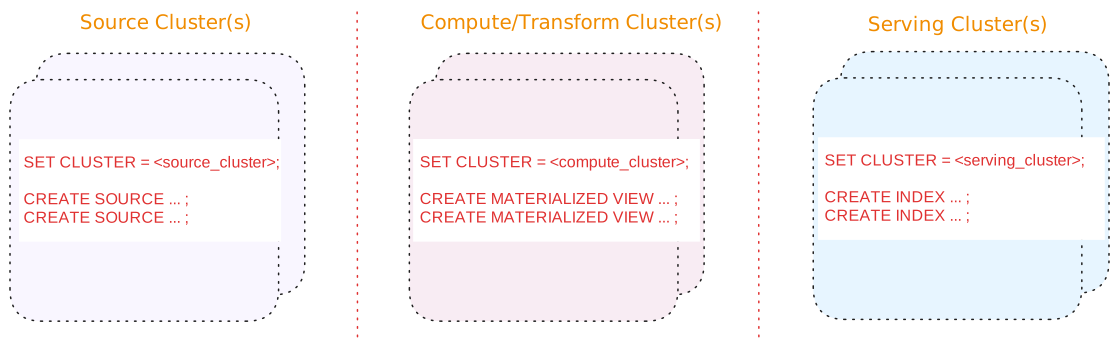
A three-tier architecture consists of:
| Tier | Description |
| --- | --- |
| Source cluster(s) | A dedicated cluster(s) for sources.
In addition, for upsert sources:
-
Consider separating upsert sources from your other sources. Upsert sources have higher resource requirements (since, for upsert sources, Materialize maintains each key and associated last value for the key as well as to perform deduplication). As such, if possible, use a separate source cluster for upsert sources.
-
Consider using a larger cluster size during snapshotting for upsert sources. Once the snapshotting operation is complete, you can downsize the cluster to align with the steady-state ingestion.
|
| Compute/Transform cluster(s) | A dedicated cluster(s) for compute/transformation:
-
Materialized views to persist, in durable storage, the results that will be served. Results of materialized views are available across all clusters.
> **Tip:** If you are using stacked views (i.e., views whose definition depends > on other views) to reduce SQL complexity, generally, only the topmost > view (i.e., the view whose results will be served) should be a > materialized view. The underlying views that do not serve results do not > need to be materialized. -
Indexes, only as needed, to make transformation fast (such as possibly indexes on join keys).
> **Tip:** From the compute/transformation clusters, do not create indexes on the > materialized views for the purposes of serving the view results. > Instead, use the [serving cluster(s)](#tier-serving-clusters) when > creating indexes to serve the results.
|
| Serving cluster(s) | A dedicated cluster(s) for serving queries, including indexes on the materialized views. Indexes are local to the cluster in which they are created. |
Benefits of a three-tier architecture include:
#### Alternatives
If a three-tier architecture is infeasible or unnecessary due to low volume or a
non-production setup, a two cluster or a single cluster architecture may
suffice.
See [Appendix: Alternative cluster
architectures](/clusters/operational-guidelines/appendix-alternative-cluster-architectures/) for details.
## Sources
### Scheduling
If possible, schedule creating new sources during off-peak hours to mitigate
the impact of snapshotting on both the upstream system and the Materialize
cluster.
### Separate cluster(s) for sources
In production, if possible, use a dedicated cluster for
[sources](/fundamentals/concepts/sources/); i.e., avoid putting sources on the same cluster
that hosts compute objects, sinks, and/or serves queries.
In addition, for upsert sources:
- Consider separating upsert sources from your other sources. Upsert sources
have higher resource requirements (since, for upsert sources, Materialize
maintains each key and associated last value for the key as well as to perform
deduplication). As such, if possible, use a separate source cluster for upsert
sources.
- Consider using a larger cluster size during snapshotting for upsert sources.
Once the snapshotting operation is complete, you can downsize the cluster to
align with the steady-state ingestion.
See also [Production cluster architecture](#three-tier-architecture).
## Sinks
### Separate sinks from sources
To allow for [blue/green deployment](/developer-tools/dbt/blue-green-deployments/), avoid
putting sinks on the same cluster that hosts sources .
See also [Cluster architecture](#three-tier-architecture).
## Snapshotting considerations
For upsert sources, snapshotting is a resource-intensive operation that can require a significant amount of CPU and memory.
## Hydration considerations
When sizing a cluster, budget for hydration memory on top of the steady-state
cost. The table below summarizes, per object type, when each object hydrates and
the memory it uses. For more on hydration, see
[Hydration](/fundamentals/concepts/hydration/). For strategies to reduce
hydration memory, see [Optimize hydration
requirements](/clusters/optimize-hydration-requirements/).
| Object | Hydration behavior |
| --- | --- |
| Materialized views | - **When**: Hydrates on creation and on every replica (re)start or cluster resize. - **What**: Rebuilds the dataflow's operator state: the arrangements that joins, aggregations, and similar operators keep to update results incrementally. Note: A materialized view's result lives in durable storage, so it rebuilds only this maintenance state, not the result. - **Memory Use**: Scales with the view's definition, which it holds at steady state, plus a transient output buffer up to twice the output size: the current output plus a read-back of the previously persisted output. On first creation, since there is no previous output, the buffer is a single output size. |
| Indexes | - **When**: Hydrates on creation and on every replica (re)start or cluster resize. - **What**: Rebuilds the arranged (indexed) data it keeps in memory to serve reads, plus any operator arrangements its dataflow maintains (for joins, aggregations, and similar). - **Memory Use**: Its memory is proportional to the indexed data plus those arrangements, and is held for as long as the index exists. |
| Kafka upsert sources and associated read-only tables/subsources | - **When**: On replica (re)start or cluster resize. These sources do not hydrate on creation; instead, on creation, their indexes are built as part of [snapshotting](/fundamentals/concepts/snapshotting/). - **What**: Rebuilds the table's or subsource's internal upsert index from storage. - **Memory Use**: The index holds the latest value per key, so its memory scales with the source's key space. On standard cluster sizes it can spill to disk when the key space exceeds memory. |
| Append-only Kafka sources and CDC database sources (PostgreSQL, MySQL, SQL Server), and their read-only tables/subsources | - **When**: On replica (re)start or cluster resize, marked hydrated as soon as the dataflow starts. - **What**: Effectively nothing. These sources keep no internal index to rebuild and resume from their persisted position, so hydration is a no-op. - **Memory Use**: Negligible, since there is no index to hold. |
| Webhook sources | Not applicable. A webhook source is not maintained by a dataflow. It receives data pushed over HTTP and writes the data directly to storage, so it does not hydrate. |
| Sinks | - **When**: If created `WITH (SNAPSHOT = true)` (the default), hydrates: - On creation, when the sink first emits its input snapshot. - On a replica (re)start, but only if the sink restarted before recording any progress: it then re-reads the whole input snapshot, and any data already written to the external system is discarded, but the memory cost still occurs. An established sink resumes from its recorded progress without re-reading the snapshot. - **What**: Loads a full copy of its input snapshot into the arrangement that feeds the sink before it can emit. - **Memory Use**: Peaks at roughly a full copy of the input snapshot, then decreases as the snapshot is written out. Negligible on a restart of an established sink. At steady state, a sink retains little in memory. |
| Subscriptions | - **When**: On creation and, while it remains active, on every replica (re)start: the dataflow is re-installed on the (re)started replica and the subscription resumes. A subscription that targets a specific replica instead ends with an error when that replica restarts. A subscription ends with its session and is not reported in `mz_hydration_statuses`. - **What**: Rebuilds the dataflow when it starts. - **Memory Use**: Scales with the dataflow, held while the subscription runs. |
## Role-based access control (RBAC)
**Cloud:**
### Cloud
##### Follow the principle of least privilege
Role-based access control in Materialize should follow the principle of
least privilege. Grant only the minimum access necessary for users and
service accounts to perform their duties.
##### Restrict the assignment of **Organization Admin** role
{{% include-headless "/headless/rbac-cloud/org-admin-recommendation" %}}
##### Restrict the granting of `CREATEROLE` privilege
{{% include-headless "/headless/rbac-cloud/createrole-consideration" %}}
##### Use Reusable Roles for Privilege Assignment
{{% include-headless "/headless/rbac-cloud/use-resusable-roles" %}}
See also [Manage database roles](/security/access-control/manage-roles/).
##### Audit for unused roles and privileges.
{{% include-headless "/headless/rbac-cloud/audit-remove-roles" %}}
See also [Show roles in
system](/security/cloud/access-control/manage-roles/#show-roles-in-system) and [Drop
a role](/security/cloud/access-control/manage-roles/#drop-a-role) for more
information.
**Self-Managed:**
### Self-Managed
##### Follow the principle of least privilege
Role-based access control in Materialize should follow the principle of
least privilege. Grant only the minimum access necessary for users and
service accounts to perform their duties.
##### Restrict the granting of `CREATEROLE` privilege
{{% include-headless "/headless/rbac-sm/createrole-consideration" %}}
##### Use Reusable Roles for Privilege Assignment
{{% include-headless "/headless/rbac-sm/use-resusable-roles" %}}
See also [Manage database roles](/security/self-managed/access-control/manage-roles/).
##### Audit for unused roles and privileges.
{{% include-headless "/headless/rbac-sm/audit-remove-roles" %}}
See also [Show roles in
system](/security/self-managed/access-control/manage-roles/#show-roles-in-system)
and [Drop a
role](/security/self-managed/access-control/manage-roles/#drop-a-role) for
more information.
---
## Optimize hydration requirements
[Hydration](/fundamentals/concepts/hydration/) primarily impacts memory usage,
and its speed scales with cluster size. This guide covers strategies to reduce
the memory a cluster needs during hydration, speed hydration up, or avoid
triggering it in the first place.
## Isolate hydration-heavy objects
- Use a dedicated cluster for [sources](/fundamentals/concepts/sources/).
- In addition, use a dedicated cluster for upsert sources; i.e., do not
co-locate with append-only Kafka sources or CDC database sources.
- Keeping append-only Kafka sources and CDC database sources (PostgreSQL,
MySQL, and SQL Server sources) on a separate cluster isolates ingestion
from possible OOM loops caused by memory-heavy objects such as Kafka
upsert sources.
- Note: PostgreSQL, MySQL, and SQL Server sources run on a single replica,
the oldest, and remain there until that replica is removed. As such, the
use of a burst replica (through [`AUTO SCALING STRATEGY (ON
HYDRATION)`](#provision-extra-capacity-while-hydrating)) has no impact on
these single-replica sources.
- Distribute materialized views and indexes across multiple clusters. Each
cluster's replicas hydrate their objects independently, which distributes
the memory required for hydration, lets objects on different clusters
hydrate in parallel, and limits how much must re-hydrate when any one
replica restarts.
## Limit concurrent hydration
By default, a replica hydrates up to 4 dataflows at a time. Lowering this
limit spreads out the memory spikes from hydrating many objects at once, at
the cost of a longer total hydration time; raising it can shorten total
hydration time at the cost of a higher peak. [Contact our team](/support/) if
you'd like to tune this for your cluster.
## Reuse arrangements across consumers
If multiple objects in the **same** cluster consume the same view, add an
[index](/fundamentals/concepts/indexes/) to that view **before** creating the
consumers. Consumers in that cluster can reuse the indexed arrangement instead
of each building equivalent in-memory state, which can reduce both memory
usage during hydration and steady-state memory.
- Index reuse is limited to the cluster the index is on, and the index must
exist **before** its consumers are created for the optimizer to reuse it.
- For a view with only one consumer, an index generally adds memory instead of
saving it.
## Split large materialized views
For a very large materialized view, consider splitting it into several
smaller materialized views, for example by a partition key such as customer,
region, or date range. Smaller materialized views can hydrate as separate
dataflows, which can bound peak memory compared with hydrating one very large
materialized view.
- This helps most when a cluster runs only a few large materialized views,
where a single view's hydration spike can dictate the cluster size. A
cluster with many materialized views already hydrates them as separate
dataflows and gets this benefit naturally.
- A re-plan or replacement of one split view affects only that portion of the
data. A replica restart still re-hydrates all views on the replica, though
in smaller units.
- If the split views share expensive computation, put that computation in a
[common indexed view first](#reuse-arrangements-across-consumers), creating
the index **before** creating the split views. Otherwise, each split view
may rebuild its own copy of the shared work, increasing total memory.
- Queries must target or combine the split views.
## Reduce arrangement memory
- For multi-way joins (more than two inputs), a [delta
join](/transform-data/optimization/#optimize-multi-way-joins-with-delta-joins)
keeps no intermediate results in memory, unlike a differential join. Index
all the join keys so the optimizer can choose a delta join.
- If your workload has columns with a small set of often-repeated values (for
example, status strings or enum-like labels), [dictionary
compression](/transform-data/dictionary-compression/) can reduce the memory
those arrangements use, at the cost of CPU and slower hydration.
- Avoid setting [`RETAIN HISTORY`](/serve-results/durable-subscriptions/) on
indexes: an index's arrangement holds its full retained history in memory,
not just the storage layer. Configure history retention on a materialized
view instead.
## Provision extra capacity while hydrating
Add an [`AUTO SCALING STRATEGY (ON
HYDRATION)`](/sql/alter-cluster/#speed-up-hydration-by-autoscaling-to-a-larger-size)
to your cluster with memory-heavy objects. With this strategy, Materialize
automatically provisions an extra, larger replica (a burst replica) while the
cluster has unhydrated objects, then removes it once a steady-size replica
catches up. You pay for the burst replica while it is provisioned, but not at
steady state.
If a steady-size replica runs out of memory during hydration, resize the
cluster. During the resize, the cluster continues to serve from the burst
replica.
## Avoid unnecessary full-cluster hydration
When changing a materialized view or index, or forcing dependents to re-plan
(for example, after dropping an index and recreating the dependents), build
the new version to the side to avoid downtime:
- A [blue/green deployment](/developer-tools/dbt/blue-green-deployments/)
hydrates the new version alongside the old and cuts over when hydrated, with
no serving gap. Note that blue/green requires sources and sinks to live on
dedicated clusters that are excluded from the swap. For more information,
see [blue/green deployment](/developer-tools/dbt/blue-green-deployments/).
- For a single materialized view, creating and hydrating a [replacement
materialized view (public preview) and replacing the existing view in
place](/transform-data/updating-materialized-views/replace-materialized-view/)
may be simpler, but briefly reduces freshness. The replacement materialized
view can be either on the same or different cluster.
> **Note:** A [slim deployment](/developer-tools/dbt/slim-deployments/) that redeploys
> only changed objects onto a copy of a cluster only exercises those objects'
> hydration spike, not the full cluster's combined spike. A cluster that
> passes a slim deployment can still fail to hydrate on the next full restart
> or upgrade. Use a [blue/green
> deployment](/developer-tools/dbt/blue-green-deployments/) in production to
> validate hydration for the whole cluster.
> **Note:** The burst-replica and blue/green strategies run extra replicas alongside the
> existing ones, as do a resize or a zero-downtime upgrade. During the overlap,
> the cluster temporarily uses additional resources. Account for the additional
> cost and, on self-managed deployments, the additional capacity required.
## Related pages
- [Hydration](/fundamentals/concepts/hydration/)
- [Operational guidelines](/clusters/operational-guidelines/)
- [Query optimization](/transform-data/optimization/)
- [Dictionary compression](/transform-data/dictionary-compression/)
- [Durable subscriptions](/serve-results/durable-subscriptions/)
- [Snapshotting](/fundamentals/concepts/snapshotting/)
- [Clusters](/fundamentals/concepts/clusters/)
- [Troubleshooting](/serve-results/troubleshooting/#hydrating-objects)
---
## System clusters
## Overview
When you enable a Materialize region, various [system
clusters](/sql/system-clusters/) are pre-installed to improve the user
experience as well as support system administration tasks.
### `quickstart` cluster
A cluster named `quickstart` with a size of `25cc` and a replication factor of
`1` will be pre-installed in every environment. You can modify or drop this
cluster at any time.
> **Note:** The default value for the `cluster` session parameter is `quickstart`.
> This cluster functions as a default option, pre-created for your convenience.
> It allows you to quickly start running queries without needing to configure a cluster first.
> If the `quickstart` cluster is dropped, you must run [`SET cluster`](/sql/select/#ad-hoc-queries)
> to choose a valid cluster in order to run `SELECT` queries. A _superuser_ (i.e. `Organization Admin`)
> can also run [`ALTER SYSTEM SET cluster`](/sql/alter-system-set) to change the
> default value.
### `mz_catalog_server` system cluster
A system cluster named `mz_catalog_server` will be pre-installed in every
environment. This cluster has several indexes installed to speed up `SHOW`
commands and queries using the system catalog.
To take advantage of these indexes, Materialize will automatically re-route
`SHOW` commands and queries using system catalog objects to the
`mz_catalog_server` system cluster. You can disable this behavior in
your session via the `auto_route_catalog_queries`
[configuration parameter](/sql/show/#other-configuration-parameters).
The following characteristics apply to the `mz_catalog_server` cluster:
* You are **not billed** for this cluster.
* You cannot create objects in this cluster.
* You cannot drop this cluster.
* You can run `SELECT` or `SUBSCRIBE` queries in this cluster as long
as you only reference objects in the [system catalog](/sql/system-catalog/).
### `mz_probe` system cluster
A system cluster named `mz_probe` will be pre-installed in every environment.
This cluster is used for internal uptime monitoring.
The following characteristics apply to the `mz_probe` cluster:
* You are **not billed** for this cluster.
* You cannot create objects in this cluster.
* You cannot drop this cluster.
* You cannot run `SELECT` or `SUBSCRIBE` queries in this cluster.
### `mz_support` system cluster
A system cluster named `mz_support` will be pre-installed in every environment.
This cluster is used for internal support tasks.
The following characteristics apply to the `mz_support` cluster:
* You are **not billed** for this cluster.
* You cannot create objects in this cluster.
* You cannot drop this cluster.
* You cannot run `SELECT` or `SUBSCRIBE` queries in this cluster.
### `mz_system` system cluster
A system cluster named `mz_system` will be pre-installed in every environment.
This cluster is used for internal system jobs.
The following characteristics apply to the `mz_system` cluster:
* You are **not billed** for this cluster.
* You cannot create objects in this cluster.
* You cannot drop this cluster.
* You cannot run `SELECT` or `SUBSCRIBE` queries in this cluster.
## Related pages
- [`CREATE CLUSTER`](/sql/create-cluster)
- [`SHOW CLUSTER`](/sql/show-clusters)
- [`DROP CLUSTER`](/sql/drop-cluster)