# Operational guidelines
General guidelines for production
The following provides some general guidelines for production.
## Clusters
### Production clusters for production workloads only
Use production cluster(s) for production workloads only. That is, avoid using
production cluster(s) to run development workloads or non-production tasks.
### Three-tier architecture
In production, use a three-tier architecture, if feasible.
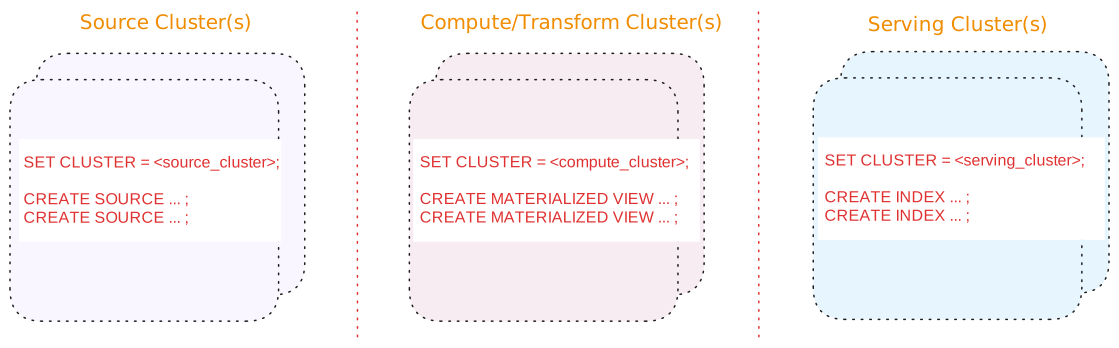
A three-tier architecture consists of:
| Tier | Description |
| --- | --- |
| Source cluster(s) | A dedicated cluster(s) for sources.
In addition, for upsert sources:
-
Consider separating upsert sources from your other sources. Upsert sources have higher resource requirements (since, for upsert sources, Materialize maintains each key and associated last value for the key as well as to perform deduplication). As such, if possible, use a separate source cluster for upsert sources.
-
Consider using a larger cluster size during snapshotting for upsert sources. Once the snapshotting operation is complete, you can downsize the cluster to align with the steady-state ingestion.
|
| Compute/Transform cluster(s) | A dedicated cluster(s) for compute/transformation:
-
Materialized views to persist, in durable storage, the results that will be served. Results of materialized views are available across all clusters.
> **Tip:** If you are using stacked views (i.e., views whose definition depends > on other views) to reduce SQL complexity, generally, only the topmost > view (i.e., the view whose results will be served) should be a > materialized view. The underlying views that do not serve results do not > need to be materialized. -
Indexes, only as needed, to make transformation fast (such as possibly indexes on join keys).
> **Tip:** From the compute/transformation clusters, do not create indexes on the > materialized views for the purposes of serving the view results. > Instead, use the [serving cluster(s)](#tier-serving-clusters) when > creating indexes to serve the results.
|
| Serving cluster(s) | A dedicated cluster(s) for serving queries, including indexes on the materialized views. Indexes are local to the cluster in which they are created. |
Benefits of a three-tier architecture include:
#### Alternatives
If a three-tier architecture is infeasible or unnecessary due to low volume or a
non-production setup, a two cluster or a single cluster architecture may
suffice.
See [Appendix: Alternative cluster
architectures](/manage/appendix-alternative-cluster-architectures/) for details.
## Sources
### Scheduling
If possible, schedule creating new sources during off-peak hours to mitigate
the impact of snapshotting on both the upstream system and the Materialize
cluster.
### Separate cluster(s) for sources
In production, if possible, use a dedicated cluster for
[sources](/concepts/sources/); i.e., avoid putting sources on the same cluster
that hosts compute objects, sinks, and/or serves queries.
In addition, for upsert sources:
-
Consider separating upsert sources from your other sources. Upsert sources
have higher resource requirements (since, for upsert sources, Materialize
maintains each key and associated last value for the key as well as to perform
deduplication). As such, if possible, use a separate source cluster for upsert
sources.
-
Consider using a larger cluster size during snapshotting for upsert sources.
Once the snapshotting operation is complete, you can downsize the cluster to
align with the steady-state ingestion.
See also [Production cluster architecture](#three-tier-architecture).
## Sinks
### Separate sinks from sources
To allow for [blue/green deployment](/manage/dbt/blue-green-deployments/), avoid
putting sinks on the same cluster that hosts sources .
See also [Cluster architecture](#three-tier-architecture).
## Snapshotting and hydration considerations
- For upsert sources, snapshotting is a resource-intensive operation that can
require a significant amount of CPU and memory.
- During hydration (both initial and subsequent rehydrations), materialized
views require memory proportional to both the input and output. When
estimating required resources, consider both the hydration cost and the
steady-state cost.
- During sink creation (initial hydration), sinks need to load an entire
snapshot of the data in memory.
## Role-based access control (RBAC)
**Cloud:**
### Cloud
##### Follow the principle of least privilege
Role-based access control in Materialize should follow the principle of
least privilege. Grant only the minimum access necessary for users and
service accounts to perform their duties.
##### Restrict the assignment of **Organization Admin** role
{{% include-headless "/headless/rbac-cloud/org-admin-recommendation" %}}
##### Restrict the granting of `CREATEROLE` privilege
{{% include-headless "/headless/rbac-cloud/createrole-consideration" %}}
##### Use Reusable Roles for Privilege Assignment
{{% include-headless "/headless/rbac-cloud/use-resusable-roles" %}}
See also [Manage database roles](/security/access-control/manage-roles/).
##### Audit for unused roles and privileges.
{{% include-headless "/headless/rbac-cloud/audit-remove-roles" %}}
See also [Show roles in
system](/security/cloud/access-control/manage-roles/#show-roles-in-system) and [Drop
a role](/security/cloud/access-control/manage-roles/#drop-a-role) for more
information.
**Self-Managed:**
### Self-Managed
##### Follow the principle of least privilege
Role-based access control in Materialize should follow the principle of
least privilege. Grant only the minimum access necessary for users and
service accounts to perform their duties.
##### Restrict the granting of `CREATEROLE` privilege
{{% include-headless "/headless/rbac-sm/createrole-consideration" %}}
##### Use Reusable Roles for Privilege Assignment
{{% include-headless "/headless/rbac-sm/use-resusable-roles" %}}
See also [Manage database roles](/security/self-managed/access-control/manage-roles/).
##### Audit for unused roles and privileges.
{{% include-headless "/headless/rbac-sm/audit-remove-roles" %}}
See also [Show roles in
system](/security/self-managed/access-control/manage-roles/#show-roles-in-system)
and [Drop a
role](/security/self-managed/access-control/manage-roles/#drop-a-role) for
more information.