# Manage Materialize
This section contains various resources for managing Materialize.
## Operational guides
| Guide | Description |
|-------|-------------|
| [Operational guidelines](/manage/operational-guidelines/) | General operational guidelines |
| [Monitoring and alerting](/manage/monitor/) | Guides to set up monitoring and alerting |
| [Disaster Recovery](/manage/disaster-recovery/) | Disaster recovery strategies for Materialize Cloud |
## Manage via dbt/Terraform
| Guide | Description |
|-------|-------------|
| [Using dbt to manage Materialize](/manage/dbt/) | Guides for using dbt to manage Materialize |
| [Using Terraform to manage Materialize](/manage/terraform/) | Guides for using Terraform to manage Materialize |
## Usage and billing
| Guide | Description |
|-------|-------------|
| [**Usage & billing**](/administration/billing/) | Understand the billing model of Materialize |
---
## Appendix: Alternative cluster architectures
If the [recommended three-tier
architecture](/manage/operational-guidelines/#three-tier-architecture)
is infeasible or unnecessary due to low volume or a **non**-production setup, a
two-tier or a one-tier architecture may suffice.
## Two-tier architecture
If the recommended three-tier
architecture
is infeasible or unnecessary due to low volume or a non-production setup, a
two-tier architecture may suffice. A two-tier architecture consists of:
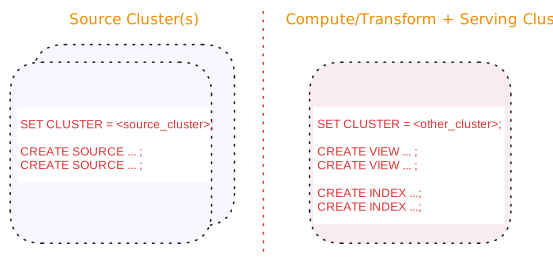
| Tier | Description |
| --- | --- |
| Source cluster(s) | A dedicated cluster(s) for sources.
In addition, for upsert sources:
-
Consider separating upsert sources from your other sources. Upsert sources have higher resource requirements (since, for upsert sources, Materialize maintains each key and associated last value for the key as well as to perform deduplication). As such, if possible, use a separate source cluster for upsert sources.
-
Consider using a larger cluster size during snapshotting for upsert sources. Once the snapshotting operation is complete, you can downsize the cluster to align with the steady-state ingestion.
|
| Compute/Transform + Serving cluster | A dedicated cluster for both compute/transformation and serving queries:
With a two-tier architecture, compute and queries compete for the same cluster resources.
> **Tip:** Except for when used with a [sink](/serve-results/sink/), > [subscribe](/sql/subscribe/), or [temporal > filters](/transform-data/patterns/temporal-filters/), avoid creating > materialized views on a shared cluster used for both compute/transformat > operations and serving queries. Use indexed views instead. |
Benefits of a two-tier architecture include:
However, with a two-tier architecture:
## One-tier architecture
If the recommended three-tier
architecture
is infeasible or unnecessary due to low volume or a non-production setup, a
one-tier architecture may suffice for your sources, compute objects,
and query serving needs.
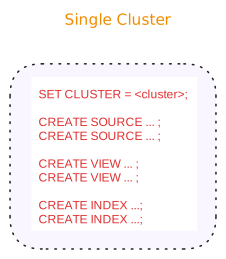
| Tier | Description |
| --- | --- |
| All-in-one cluster | A cluster for sources, compute/transformation and serving queries:
With a 1-tier single-cluster architecture, sources, compute, and queries compete for the same cluster resources.
> **Tip:** Except for when used with a [sink](/serve-results/sink/), > [subscribe](/sql/subscribe/), or [temporal > filters](/transform-data/patterns/temporal-filters/), avoid creating > materialized views on a shared cluster used for both compute/transformat > operations and serving queries. Use indexed views instead. |
Benefits of a one-tier architecture include:
Limitations of a one-tier architecture include:
-
Sources, compute objects, and queries compete for cluster resources.
-
Blue/green
deployment is
unsupported since sources would need to be dropped and recreated, putting strain on your upstream system during source recreation.
To support blue/green deployments, use a two-tier architecture by moving
compute objects to a new cluster (i.e., recreating compute objects in a new cluster).
-
Cluster restarts require rehydration of the indexes on views.
---
## Disaster recovery (Cloud)
The following outlines various disaster recovery (DR) strategies for
Materialize.
## Level 1: Basic configuration (Intra-Region Recovery)
Because Materialize is deterministic and its infrastructure runs on a container
scheduler (AWS EKS), basic Materialize configuration provides intra-region
disaster recovery **as long as**:
- Materialize can spin up a new pod somewhere in the region, and
- S3 is available.
In such cases, your mean time to recovery is the **same as your compute
cluster's rehydration time**.
> **💡 Recommendation:** When running with the basic configuration, we recommend that you track your rehydration time to ensure that it is within an acceptable range for your business' risk tolerance.
## Level 2: Multi-replica clusters (High availability across AZs)
> **Note:** The hybrid strategy is available if your deployment uses a [three-tier or a
> two-tier architecture](/manage/operational-guidelines/).
Materialize supports multi-replica clusters, allowing for distribution across
Availability Zones (AZs):
-
For clusters sized up to and including 3200cc, Materialize guarantees
that all provisioned replicas in a cluster are distributed across the
underlying cloud provider’s availability zones.
-
For clusters sized above 3200cc, even distribution of replicas
across availability zones cannot be guaranteed.
Multi-replica **compute clusters** and multi-replica **serving clusters**
(excluding sink clusters) with replicas distributed across AZs provide DR
resilience against: machine-level failures; rack and building-level outages; and
AZ level failures for those clusters:
- With multi-replica **compute clusters**, each replica performs the same work.
- With multi-replica **serving clusters** (excluding sink clusters), each
replica processes the same queries.
As such, your compute and serving clusters will continue to serve up-to-date
data uninterrupted in the case of a replica failure.
> **💡 Cost and work capacity:** -
Each replica incurs cost, calculated as cluster size * replication factor per second. See Usage & billing for more details.
-
Increasing the replication factor does not increase the cluster’s work capacity. Replicas are exact copies of one another: each replica must do exactly the same work as all the other replicas of the cluster(i.e., maintain the same dataflows and process the same queries). To increase the capacity of a cluster, you must increase its size.
If you require resilience beyond a single region, consider the Level 3 strategy.
## Level 3: A duplicate Materialize environment (Inter-region resilience)
> **Note:** The duplicate environment strategy assumes the use of Infrastructure-as-Code
> (IaC) practice for managing the environment. This ensures that catalog data,
> including your RBAC setup, is identical in the second environment.
For region-level fault tolerance, you can choose to have a second Materialize
environment in another region. With this strategy:
- You avoid complicated cross-regional communication.
- You avoid state dependency checks and verifications.
- And, because Materialize is deterministic, as long as your upstream sources
can also be accessed from the second region, the two Materialize environments
can guarantee the same results.
> **💡 No strict transactional consistency between environments:** This approach does **not** offer strict transactional consistency across regions. However, as long as both regions are caught up, the results should be within about a second of each other.
The duplicate Materialize environment setup can be adapted into a more
cost-effective setup if your deployment uses a [three-tier or a two-tier
architecture](/manage/operational-guidelines/). For details, see the [hybrid
variation](#hybrid-variation).
### Hybrid variation
> **Note:** - The hybrid strategy is available if your deployment uses a [three-tier or a
> two-tier architecture](/manage/operational-guidelines/).
> - The duplicate environment strategy assumes the use of Infrastructure-as-Code
> (IaC) practice for managing the environment. This ensures that catalog data,
> including your RBAC setup, is identical in the second environment.
For a more cost-effective variation to the duplicate Materialize environment in
another region, you can choose a hybrid strategy where:
- Only the sources clusters are running in the second Materialize environment.
- The compute clusters are provisioned **only** in the event of an incident.
When combined with a [multi-replica
approach](#level-2--multi-replica-clusters-high-availability-across-azs), you
have:
- Immediate failover during an AZ failure.
- Downtime equal to hydration time during intra-region failover.
## See also
- [Materialize DR
characteristics](/manage/disaster-recovery/recovery-characteristics)
---
## Monitoring and alerting
## Cloud
### Monitoring
You can monitor the performance and overall health of your Materialize region.
To help you get started, the following guides are available:
- [Datadog](/manage/monitor/cloud/datadog/)
- [Grafana](/manage/monitor/cloud/grafana/)
### Alerting
After setting up a monitoring tool, you can configure alert rules. Alert rules
send a notification when a metric surpasses a threshold. This will help you
prevent operational incidents. For alert rules guidelines, see
[Alerting](/manage/monitor/cloud/alerting/).
## Self-Managed
### Monitoring
You can monitor the performance and overall health of your Self-Managed
Materialize.
To help you get started, the following guides are available:
- [Grafana using Prometheus](/manage/monitor/self-managed/prometheus/)
- [Datadog using Prometheus SQL Exporter](/manage/monitor/self-managed/datadog/)
### Alerting
After setting up a monitoring tool, you can configure alert rules. Alert rules
send a notification when a metric surpasses a threshold. This will help you
prevent operational incidents. For alert rules guidelines, see
[Alerting](/manage/monitor/self-managed/alerting/).
---
## Operational guidelines
The following provides some general guidelines for production.
## Clusters
### Production clusters for production workloads only
Use production cluster(s) for production workloads only. That is, avoid using
production cluster(s) to run development workloads or non-production tasks.
### Three-tier architecture
In production, use a three-tier architecture, if feasible.
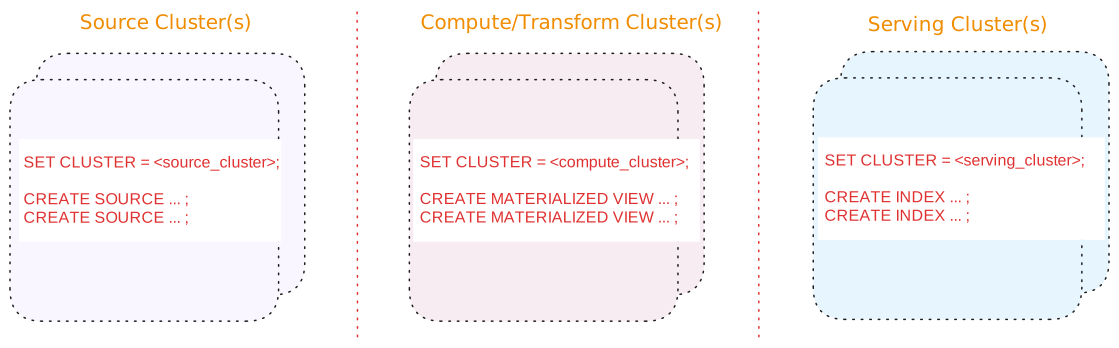
A three-tier architecture consists of:
| Tier | Description |
| --- | --- |
| Source cluster(s) | A dedicated cluster(s) for sources.
In addition, for upsert sources:
-
Consider separating upsert sources from your other sources. Upsert sources have higher resource requirements (since, for upsert sources, Materialize maintains each key and associated last value for the key as well as to perform deduplication). As such, if possible, use a separate source cluster for upsert sources.
-
Consider using a larger cluster size during snapshotting for upsert sources. Once the snapshotting operation is complete, you can downsize the cluster to align with the steady-state ingestion.
|
| Compute/Transform cluster(s) | A dedicated cluster(s) for compute/transformation:
-
Materialized views to persist, in durable storage, the results that will be served. Results of materialized views are available across all clusters.
> **Tip:** If you are using stacked views (i.e., views whose definition depends > on other views) to reduce SQL complexity, generally, only the topmost > view (i.e., the view whose results will be served) should be a > materialized view. The underlying views that do not serve results do not > need to be materialized. -
Indexes, only as needed, to make transformation fast (such as possibly indexes on join keys).
> **Tip:** From the compute/transformation clusters, do not create indexes on the > materialized views for the purposes of serving the view results. > Instead, use the [serving cluster(s)](#tier-serving-clusters) when > creating indexes to serve the results.
|
| Serving cluster(s) | A dedicated cluster(s) for serving queries, including indexes on the materialized views. Indexes are local to the cluster in which they are created. |
Benefits of a three-tier architecture include:
#### Alternatives
If a three-tier architecture is infeasible or unnecessary due to low volume or a
non-production setup, a two cluster or a single cluster architecture may
suffice.
See [Appendix: Alternative cluster
architectures](/manage/appendix-alternative-cluster-architectures/) for details.
## Sources
### Scheduling
If possible, schedule creating new sources during off-peak hours to mitigate
the impact of snapshotting on both the upstream system and the Materialize
cluster.
### Separate cluster(s) for sources
In production, if possible, use a dedicated cluster for
[sources](/concepts/sources/); i.e., avoid putting sources on the same cluster
that hosts compute objects, sinks, and/or serves queries.
In addition, for upsert sources:
-
Consider separating upsert sources from your other sources. Upsert sources
have higher resource requirements (since, for upsert sources, Materialize
maintains each key and associated last value for the key as well as to perform
deduplication). As such, if possible, use a separate source cluster for upsert
sources.
-
Consider using a larger cluster size during snapshotting for upsert sources.
Once the snapshotting operation is complete, you can downsize the cluster to
align with the steady-state ingestion.
See also [Production cluster architecture](#three-tier-architecture).
## Sinks
### Separate sinks from sources
To allow for [blue/green deployment](/manage/dbt/blue-green-deployments/), avoid
putting sinks on the same cluster that hosts sources .
See also [Cluster architecture](#three-tier-architecture).
## Snapshotting and hydration considerations
- For upsert sources, snapshotting is a resource-intensive operation that can
require a significant amount of CPU and memory.
- During hydration (both initial and subsequent rehydrations), materialized
views require memory proportional to both the input and output. When
estimating required resources, consider both the hydration cost and the
steady-state cost.
- During sink creation (initial hydration), sinks need to load an entire
snapshot of the data in memory.
## Role-based access control (RBAC)
**Cloud:**
### Cloud
##### Follow the principle of least privilege
Role-based access control in Materialize should follow the principle of
least privilege. Grant only the minimum access necessary for users and
service accounts to perform their duties.
##### Restrict the assignment of **Organization Admin** role
{{% include-headless "/headless/rbac-cloud/org-admin-recommendation" %}}
##### Restrict the granting of `CREATEROLE` privilege
{{% include-headless "/headless/rbac-cloud/createrole-consideration" %}}
##### Use Reusable Roles for Privilege Assignment
{{% include-headless "/headless/rbac-cloud/use-resusable-roles" %}}
See also [Manage database roles](/security/access-control/manage-roles/).
##### Audit for unused roles and privileges.
{{% include-headless "/headless/rbac-cloud/audit-remove-roles" %}}
See also [Show roles in
system](/security/cloud/access-control/manage-roles/#show-roles-in-system) and [Drop
a role](/security/cloud/access-control/manage-roles/#drop-a-role) for more
information.
**Self-Managed:**
### Self-Managed
##### Follow the principle of least privilege
Role-based access control in Materialize should follow the principle of
least privilege. Grant only the minimum access necessary for users and
service accounts to perform their duties.
##### Restrict the granting of `CREATEROLE` privilege
{{% include-headless "/headless/rbac-sm/createrole-consideration" %}}
##### Use Reusable Roles for Privilege Assignment
{{% include-headless "/headless/rbac-sm/use-resusable-roles" %}}
See also [Manage database roles](/security/self-managed/access-control/manage-roles/).
##### Audit for unused roles and privileges.
{{% include-headless "/headless/rbac-sm/audit-remove-roles" %}}
See also [Show roles in
system](/security/self-managed/access-control/manage-roles/#show-roles-in-system)
and [Drop a
role](/security/self-managed/access-control/manage-roles/#drop-a-role) for
more information.
---
## Use dbt to manage Materialize
[dbt](https://docs.getdbt.com/docs/introduction) has become the standard for
data transformation ("the T in ELT"). It combines the accessibility of SQL with
software engineering best practices, allowing you to not only build reliable
data pipelines, but also document, test and version-control them.
Setting up a dbt project with Materialize is similar to setting it up with any
other database that requires a non-native adapter.
> **Note:** The `dbt-materialize` adapter can only be used with **dbt Core**. Making the
> adapter available in dbt Cloud depends on prioritization by dbt Labs. If you
> require dbt Cloud support, please [reach out to the dbt Labs team](https://www.getdbt.com/community/join-the-community/).
## Available guides
## See also
As a tool primarily meant to manage your data model, the `dbt-materialize`
adapter does not expose all Materialize objects types. If there is a **clear
separation** between data modeling and **infrastructure management ownership**
in your team, and you want to manage objects like
[clusters](/concepts/clusters/), [connections](/sql/create-connection/), or
[secrets](/sql/create-secret/) as code, we recommend using the [Materialize
Terraform provider](/manage/terraform/) as a complementary deployment tool.
---
## Use Terraform to manage Materialize
[Terraform](https://www.terraform.io/) is an infrastructure-as-code tool that
allows you to manage your resources in a declarative configuration language.
Materialize maintains a [Terraform provider](https://registry.terraform.io/providers/MaterializeInc/materialize/latest/docs)
to help you safely and predictably provision and manage connections, sources,
and other database objects.
Materialize also maintains [several
modules](/manage/terraform/manage-cloud-modules) that make it easier to manage
other cloud resources that Materialize depends on. Modules allow you to bypass
manually configuring cloud resources and are an efficient way of deploying
infrastructure with a single `terraform apply` command.
## Available guides
## Contributing
If you want to help develop the Materialize provider, check out the [contribution guidelines](https://github.com/MaterializeInc/terraform-provider-materialize/blob/main/CONTRIBUTING.md).