`.
For example, to delete replica `r1` in cluster `cluster1`:
```mzsql
DROP CLUSTER REPLICA cluster1.r1
```
- **Roles**: Referenced by their name. For example, to alter the `manager` role, your SQL statement would be:
```mzsql
ALTER ROLE manager ...
```
### Other object namespace constraints
- Two clusters or two roles cannot have the same name. However, a cluster and a
role can have the same name.
- Replicas can have the same names as long as they belong to different clusters.
Materialize automatically assigns names to replicas (e.g., `r1`, `r2`).
## Database details
- By default, Materialize regions have a database named `materialize`.
- By default, each database has a schema called `public`.
- You can specify which database you connect to either when you connect (e.g.
`psql -d my_db ...`) or within SQL using [`SET DATABASE`](/sql/set/) (e.g.
`SET DATABASE = my_db`).
- Materialize allows cross-database queries.
---
## Clusters
## Overview
Clusters are pools of compute resources (CPU, memory, and scratch disk space)
for running your workloads.
The following operations require compute resources in Materialize, and so need
to be associated with a cluster:
- Maintaining [sources](/concepts/sources/) and [sinks](/concepts/sinks/).
- Maintaining [indexes](/concepts/indexes/) and [materialized
views](/concepts/views/#materialized-views).
- Executing [`SELECT`](/sql/select/) and [`SUBSCRIBE`](/sql/subscribe/)
statements.
## Resource isolation
Clusters provide **resource isolation.** Each cluster provisions dedicated
compute resources and can fail independently from other clusters.
Workloads on different clusters are strictly isolated from one another. That is,
a given workload has access only to the CPU, memory, and scratch disk of the
cluster that it is running on. All workloads on a given cluster compete for
access to that cluster's compute resources.
## Fault tolerance
The [replication factor](/sql/create-cluster/#replication-factor) of a cluster
determines the number of replicas provisioned for the cluster. Each replica of
the cluster provisions a new pool of compute resources to perform exactly the
same work on exactly the same data.
Provisioning more than one replica for a cluster improves **fault tolerance**.
Clusters with multiple replicas can tolerate failures of the underlying
hardware that cause a replica to become unreachable. As long as one replica of
the cluster remains available, the cluster can continue to maintain dataflows
and serve queries.
> **Note:**
> -
>
Each replica incurs cost, calculated as cluster size * replication factor per second. See Usage &
> billing for more details.
>
> -
>
Increasing the replication factor does not increase the cluster’s work
> capacity. Replicas are exact copies of one another: each replica must do
> exactly the same work as all the other replicas of the cluster(i.e., maintain
> the same dataflows and process the same queries). To increase the capacity of
> a cluster, you must increase its size.
>
>
Materialize automatically assigns names to replicas (e.g., `r1`, `r2`). You can
view information about individual replicas in the Materialize console and the
system catalog.
### Availability guarantees
When provisioning replicas,
-
For clusters sized up to and including 3200cc, Materialize guarantees
that all provisioned replicas in a cluster are distributed across the
underlying cloud provider’s availability zones.
-
For clusters sized above 3200cc, even distribution of replicas
across availability zones cannot be guaranteed.
## Cluster sizing
When creating a cluster, you must choose its [size](/sql/create-cluster/#size)
(e.g., `25cc`, `50cc`, `100cc`), which determines its resource allocation
(CPU, memory, and scratch disk space) and [cost](/administration/billing/#compute).
The appropriate size for a cluster depends on the resource requirements of your
workload. Larger clusters have more compute
resources available and can therefore process data faster and handle larger data
volumes.
As your workload changes, you can [resize a cluster](/sql/alter-cluster/).
> **Tip:** To gauge the performance and utilization of your clusters, use the
> [**Environment Overview** page in the Materialize Console](/console/monitoring/).
## Best practices
The following provides some general guidelines for clusters. See also
[Operational guidelines](/manage/operational-guidelines/).
### Three-tier architecture in production
In production, use a three-tier architecture, if feasible.
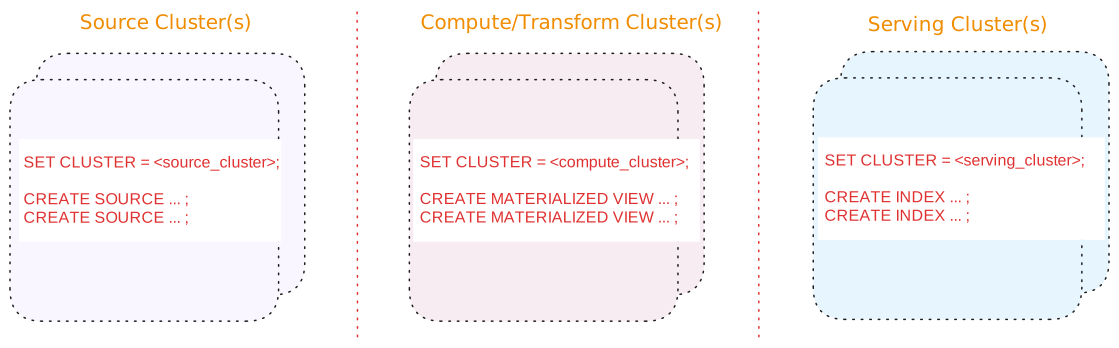
A three-tier architecture consists of:
| Tier | Description |
| --- | --- |
| Source cluster(s) | A dedicated cluster(s) for sources.
In addition, for upsert sources:
-
Consider separating upsert sources from your other sources. Upsert sources have higher resource requirements (since, for upsert sources, Materialize maintains each key and associated last value for the key as well as to perform deduplication). As such, if possible, use a separate source cluster for upsert sources.
-
Consider using a larger cluster size during snapshotting for upsert sources. Once the snapshotting operation is complete, you can downsize the cluster to align with the steady-state ingestion.
|
| Compute/Transform cluster(s) | A dedicated cluster(s) for compute/transformation:
-
Materialized views to persist, in durable storage, the results that will be served. Results of materialized views are available across all clusters.
> **Tip:** If you are using stacked views (i.e., views whose definition depends > on other views) to reduce SQL complexity, generally, only the topmost > view (i.e., the view whose results will be served) should be a > materialized view. The underlying views that do not serve results do not > need to be materialized. -
Indexes, only as needed, to make transformation fast (such as possibly indexes on join keys).
> **Tip:** From the compute/transformation clusters, do not create indexes on the > materialized views for the purposes of serving the view results. > Instead, use the [serving cluster(s)](#tier-serving-clusters) when > creating indexes to serve the results.
|
| Serving cluster(s) | A dedicated cluster(s) for serving queries, including indexes on the materialized views. Indexes are local to the cluster in which they are created. |
Benefits of a three-tier architecture include:
See also [Operational guidelines](/manage/operational-guidelines/).
#### Alternatives
Alternatively, if a three-tier architecture is not feasible or unnecessary due
to low volume or a non-production setup, a two cluster or a single cluster
architecture may suffice.
See [Appendix: Alternative cluster
architectures](/manage/appendix-alternative-cluster-architectures/) for details.
### Use production clusters for production workloads only
Use production cluster(s) for production workloads only. That is, avoid using
production cluster(s) to run development workloads or non-production tasks.
### Consider hydration requirements
During hydration, materialized views require memory proportional to both the
input and output. When estimating required resources, consider both the
hydration cost and the steady-state cost.
## Related pages
- [`CREATE CLUSTER`](/sql/create-cluster)
- [`ALTER CLUSTER`](/sql/alter-cluster)
- [System clusters](/sql/system-clusters)
- [Usage & billing](/administration/billing/)
- [Operational guidelines](/manage/operational-guidelines/)
---
## Indexes
## Overview
In Materialize, indexes represent query results stored in memory **within a
[cluster](/concepts/clusters/)**. You can create indexes on
[sources](/concepts/sources/), [views](/concepts/views/#views), or [materialized
views](/concepts/views/#materialized-views).
## Indexes on sources
> **Note:** In practice, you may find that you rarely need to index a source
> without performing some transformation using a view, etc.
In Materialize, you can create indexes on a [source](/concepts/sources/) to
maintain in-memory up-to-date source data within the cluster you create the
index. This can help improve [query
performance](#indexes-and-query-optimizations) when serving results directly
from the source or when [using joins](/transform-data/optimization/#join).
However, in practice, you may find that you rarely need to index a source
directly.
```mzsql
CREATE INDEX idx_on_my_source ON my_source (...);
```
## Indexes on views
In Materialize, you can create indexes on a [view](/concepts/views/#views "query
saved under a name") to maintain **up-to-date view results in memory** within
the [cluster](/concepts/clusters/) you create the index.
```mzsql
CREATE INDEX idx_on_my_view ON my_view_name(...) ;
```
During the index creation on a [view](/concepts/views/#views "query saved under
a name"), the view is executed and the view results are stored in memory within
the cluster. **As new data arrives**, the index **incrementally updates** the
view results in memory.
Within the cluster, querying an indexed view is:
- **fast** because the results are served from memory, and
- **computationally free** because no computation is performed on read.
For best practices on using indexes, and understanding when to use indexed views
vs. materialized views, see [Usage patterns](#usage-patterns).
## Indexes on materialized views
In Materialize, materialized view results are stored in durable storage and
**incrementally updated** as new data arrives. Indexing a materialized view
makes the already up-to-date view results available **in memory** within the
[cluster](/concepts/clusters/) you create the index. That is, indexes on
materialized views require no additional computation to keep results up-to-date.
> **Note:** A materialized view can be queried from any cluster whereas its indexed results
> are available only within the cluster you create the index. Querying a
> materialized view, whether indexed or not, from any cluster is computationally
> free. However, querying an indexed materialized view within the cluster where
> the index is created is faster since the results are served from memory rather
> than from storage.
For best practices on using indexes, and understanding when to use indexed views
vs. materialized views, see [Usage patterns](#usage-patterns).
```mzsql
CREATE INDEX idx_on_my_mat_view ON my_mat_view_name(...) ;
```
## Indexes and clusters
Indexes are local to a cluster. Queries in a different cluster cannot use the
indexes in another cluster.
For example, to create an index in the current cluster:
```mzsql
CREATE INDEX idx_on_my_view ON my_view_name(...) ;
```
You can also explicitly specify the cluster:
```mzsql
CREATE INDEX idx_on_my_view IN CLUSTER active_cluster ON my_view (...);
```
## Usage patterns
### Index usage
> **Important:** Indexes are local to a cluster. Queries in one cluster cannot use the indexes in another, different cluster.
Unlike some other databases, Materialize can use an index to serve query results
even if the query does not specify a `WHERE` condition on the index key. Serving
queries from an index is fast since the results are already up-to-date and in
memory.
For example, consider the following index:
```mzsql
CREATE INDEX idx_orders_view_qty ON orders_view (quantity);
```
Materialize will maintain the `orders_view` in memory in `idx_orders_view_qty`,
and it will be able to use the index to serve a various queries on the
`orders_view` (and not just queries that specify conditions on
`orders_view.quantity`).
Materialize can use the index for the following queries (issued from the same
cluster as the index) on `orders_view`:
```mzsql
SELECT * FROM orders_view; -- scans the index
SELECT * FROM orders_view WHERE status = 'shipped'; -- scans the index
SELECT * FROM orders_view WHERE quantity = 10; -- point lookup on the index
```
For the queries that do not specify a condition on the indexed field,
Materialize scans the index. For the query that specifies an equality condition
on the indexed field, Materialize performs a **point lookup** on the index
(i.e., reads just the matching records from the index). Point lookups are the
most efficient use of an index.
#### Point lookups
Materialize performs **point lookup** (i.e., reads just the matching records
from the index) on the index if the query's `WHERE` clause:
- Specifies equality (`=` or `IN`) condition and **only** equality conditions on
**all** the indexed fields. The equality conditions must specify the **exact**
index key expression (including type) for point lookups. For example:
- If the index is on `round(quantity)`, the query must specify equality
condition on `round(quantity)` (and not just `quanity`) for Materialize to
perform a point lookup.
- If the index is on `quantity * price`, the query must specify equality
condition on `quantity * price` (and not `price * quantity`) for Materialize
to perform a point lookup.
- If the index is on the `quantity` field which is an integer, the query must
specify an equality condition on `quantity` with a value that is an integer.
- Only uses `AND` (conjunction) to combine conditions for **different** fields.
Point lookups are the most efficient use of an index.
For queries whose `WHERE` clause meets the point lookup criteria and includes
conditions on additional fields (also using `AND` conjunction), Materialize
performs a point lookup on the index keys and then filters the results using the
additional conditions on the non-indexed fields.
For queries that do not meet the point lookup criteria, Materialize performs a
full index scan (including for range queries). That is, Materialize performs a
full index scan if the `WHERE` clause:
- Does not specify **all** the indexed fields.
- Does not specify only equality conditions on the index fields or specifies an
equality condition that specifies a different value type than the index key
type.
- Uses OR (disjunction) to combine conditions for **different** fields.
Full index scans are less efficient than point lookups. The performance of full
index scans will degrade with data volume; i.e., as you get more data, full
scans will get slower.
#### Examples
Consider again the following index on a view:
```mzsql
CREATE INDEX idx_orders_view_qty on orders_view (quantity);
```
The following table shows various queries and whether Materialize performs a
point lookup or an index scan.
| Query | Index Usage |
| --- | --- |
| SELECT * FROM orders_view;
SELECT * FROM orders_view WHERE quantity = 10;
SELECT * FROM orders_view WHERE quantity IN (10, 20);
SELECT * FROM orders_view WHERE quantity = 10 OR quantity = 20;
OR to combine conditions on the same field. |
| SELECT * FROM orders_view WHERE quantity = 10 AND price = 5.00;
quantity, then filter on price. |
| SELECT * FROM orders_view WHERE (quantity, price) = (10, 5.00);
quantity, then filter on price. |
| SELECT * FROM orders_view WHERE quantity = 10 OR price = 5.00;
OR to combine conditions on different fields. |
| SELECT * FROM orders_view WHERE quantity <= 10;
SELECT * FROM orders_view WHERE round(quantity) = 20;
-- Assume quantity is an integer SELECT * FROM orders_view WHERE quantity = 'hello'; SELECT * FROM orders_view WHERE quantity::TEXT = 'hello';
quantity field in orders_view is an integer. In the first query, the quantity is implicitly cast to text. In the second query, the quantity is explicitly cast to text. |
Consider that the view has an index on the `quantity` and `price` fields
instead of an index on the `quantity` field:
```mzsql
DROP INDEX idx_orders_view_qty;
CREATE INDEX idx_orders_view_qty_price on orders_view (quantity, price);
```
| Query | Index Usage |
| --- | --- |
| SELECT * FROM orders_view;
SELECT * FROM orders_view WHERE quantity = 10;
SELECT * FROM orders_view WHERE quantity = 10 AND price = 2.50;
SELECT * FROM orders_view WHERE quantity = 10 OR price = 2.50;
OR to combine conditions on different fields. |
| SELECT * FROM orders_view WHERE quantity = 10 AND (price = 2.50 OR price = 3.00);
OR to combine conditions on same field and AND to combine conditions on different fields. |
| SELECT * FROM orders_view WHERE quantity = 10 AND price = 2.50 AND item = 'cupcake';
quantity and price, then filter on item. |
| SELECT * FROM orders_view WHERE quantity = 10 AND price = 2.50 OR item = 'cupcake';
OR to combine conditions on different fields. |
#### Limitations
Indexes in Materialize do not order their keys using the data type's natural
ordering and instead orders by its internal representation of the key (the tuple
of key length and value).
As such, indexes in Materialize currently do not provide optimizations for:
- Range queries; that is queries using `>`, `>=`,
`<`, `<=`, `BETWEEN` clauses (e.g., `WHERE
quantity > 10`, `price >= 10 AND price <= 50`, and `WHERE quantity
BETWEEN 10 AND 20`).
- `GROUP BY`, `ORDER BY` and `LIMIT` clauses.
### Indexes on views vs. materialized views
In Materialize, both indexes on views and materialized
views incrementally update the view
results when Materialize ingests new data. Whereas materialized views persist
the view results in durable storage and can be accessed across clusters, indexes
on views compute and store view results in memory within a single cluster.
Some general guidelines for usage patterns include:
| Usage Pattern |
General Guideline |
View results are accessed from a single cluster only;
such as in a 1-cluster or a 2-cluster architecture. |
View with an index |
| View used as a building block for stacked views; i.e., views not used to serve results. |
View |
View results are accessed across clusters;
such as in a 3-cluster architecture. |
Materialized view (in the transform cluster)
Index on the materialized view (in the serving cluster) |
Use with a sink or a SUBSCRIBE operation |
Materialized view |
| Use with temporal filters |
Materialized view |
For example:
**3-tier architecture:**

In a [3-tier
architecture](/manage/operational-guidelines/#three-tier-architecture)
where queries are served from a cluster different from the compute/transform
cluster that maintains the view results:
- Use materialized view(s) in the compute/transform cluster for the query
results that will be served.
If you are using stacked views (i.e., views whose definition depends
on other views) to reduce SQL complexity, generally, only the topmost
view (i.e., the view whose results will be served) should be a
materialized view. The underlying views that do not serve results do not
need to be materialized.
- Index the materialized view in the serving cluster(s) to serve the results
from memory.
**2-tier architecture:**

In a [2-tier
architecture](/manage/appendix-alternative-cluster-architectures/#two-tier-architecture)
where queries are served from the same cluster that performs the
compute/transform operations:
- Use view(s) in the shared cluster.
- Index the view(s) to incrementally update the view results and serve the
results from memory.
> **Tip:** Except for when used with a [sink](/serve-results/sink/),
> [subscribe](/sql/subscribe/), or [temporal
> filters](/transform-data/patterns/temporal-filters/), avoid creating
> materialized views on a shared cluster used for both compute/transformat
> operations and serving queries. Use indexed views instead.
**1-tier architecture:**

In a [1-tier
architecture](/manage/appendix-alternative-cluster-architectures/#one-tier-architecture)
where queries are served from the same cluster that performs the
compute/transform operations:
- Use view(s) in the shared cluster.
- Index the view(s) to incrementally update the view results and serve the
results from memory.
> **Tip:** Except for when used with a [sink](/serve-results/sink/),
> [subscribe](/sql/subscribe/), or [temporal
> filters](/transform-data/patterns/temporal-filters/), avoid creating
> materialized views on a shared cluster used for both compute/transformat
> operations and serving queries. Use indexed views instead.
### Indexes and query optimizations
By making up-to-date results available in memory, indexes can help [optimize
query performance](/transform-data/optimization/), such as:
- Provide faster sequential access than unindexed data.
- Provide fast random access for lookup queries (i.e., selecting individual
keys).
Specific instances where indexes can be useful to improve performance include:
-
When used in ad-hoc queries.
-
When used by multiple queries within the same cluster.
-
When used to enable delta
joins.
For more information, see Optimization.
### Best practices
Before creating an index, consider the following:
-
If you create stacked views (i.e., views that depend on other views) to
reduce SQL complexity, we recommend that you create an index only on the
view that will serve results, taking into account the expected data access
patterns.
-
Materialize can reuse indexes across queries that concurrently access the same
data in memory, which reduces redundancy and resource utilization per query.
In particular, this means that joins do not need to store data in memory
multiple times.
-
For queries that have no supporting indexes, Materialize uses the same
mechanics used by indexes to optimize computations. However, since this
underlying work is discarded after each query run, take into account the
expected data access patterns to determine if you need to index or not.
## Related pages
- [Optimization](/transform-data/optimization)
- [Views](/concepts/views)
- [`CREATE INDEX`](/sql/create-index)
---
## Reaction Time, Freshness, and Query Latency
In operational data systems, the performance and responsiveness of queries depend not only on how fast a query runs, but also on how current the underlying data is. This page introduces three foundational concepts for evaluating and understanding system responsiveness in Materialize:
* **Freshness**: the time it takes for a change in an upstream system to become visible in the results of a query.
* **Query latency**: the time it takes to compute and return the result of a SQL query once the data is available in the system.
* **Reaction time**: the total delay from data change to observable result.
Together, these concepts form the basis for understanding how Materialize enables timely, accurate insights across operational and analytical workloads.
---
## Freshness
**Freshness** measures the time it takes for a change in an upstream system to become visible in the results of a query. In other words, it captures the end-to-end latency between when data is produced and when it becomes part of the transformed, queryable state.
| System | Performance | Explanation |
| -------------- | ------------ | -------------------------- |
| OLTP Database | Excellent | Freshness is effectively zero. Queries run directly against the source of truth, and changes are visible immediately. |
| Data Warehouse | Poor (stale) | Freshness is often poor due to scheduled batch ingestion. Changes may take minutes to hours to propagate. |
| Materialize | Excellent | Freshness is low, typically within milliseconds to a few seconds, due to continuous ingestion and incremental view maintenance. |
### Monitoring Freshness
You can monitor data freshness in Materialize by querying wallclock lag measurements from the [`mz_internal.mz_wallclock_global_lag`](/reference/system-catalog/mz_internal/#mz_wallclock_global_lag) system catalog view.
Wallclock lag indicates how far behind real-world wall-clock time your data objects are, helping you understand freshness across your materialized views, indexes, and sources.
```sql
SELECT object_id, lag
FROM mz_internal.mz_wallclock_global_lag;
```
---
## Query Latency
**Query latency** refers to the time it takes to compute and return the result of a SQL query once the data is available in the system. It is affected by the system's execution model, indexing strategies, and the complexity of the query itself.
| System | Performance | Explanation |
| -------------- | ------------ | -------------------------- |
| OLTP Database | Poor (slow) | Optimized for transactional workloads and point lookups. Complex analytical queries involving joins, filters, and aggregations tend to exhibit poor query latency. |
| Data Warehouse | Excellent | Designed for analytical processing, and generally provide excellent query latency even for complex queries over large datasets. |
| Materialize | Excellent | Maintains low query latency by incrementally updating and indexing the results of complex views. Queries that read from indexed views typically return results in milliseconds. |
---
## Reaction Time
**Reaction time** is defined as the sum of freshness and query latency. It captures the total time from when a data change occurs upstream to when a downstream consumer can query and act on that change.
```
reaction time = freshness + query latency
```
This is the most comprehensive measure of system responsiveness and is particularly relevant for applications that depend on timely and accurate decision-making.
| System | Reaction Time |
| -------------- | ------------- |
| OLTP Database | High |
| Data Warehouse | High |
| Materialize | Low |
## Example
Consider an e-commerce application that needs to monitor order fulfillment rates in real time. This requires both timely access to new orders and the ability to compute aggregates across multiple related tables.
Let’s compare how this plays out across three systems:
| **System** | **Data Freshness** | **Query Latency** |
|-------------------|-------------------------------------------------------------------------------------------------------------------------------|--------------------------------------------------------------------------------------------------------------------------------------------------------|
| **OLTP System** | The order and fulfillment data is always current, as queries run directly against the transactional system. | Computing fulfillment rates involves joins and aggregations over multiple tables, which transactional databases are not optimized for. Queries may be slow or resource-intensive. |
| **Data Warehouse**| The data is typically ingested in batches, so it may lag behind by minutes or hours. Freshness depends on the ETL schedule. | Analytical queries, including aggregations and joins, are well-optimized and typically return quickly. |
| **Materialize** | Updates stream in continuously from the operational database. Materialize incrementally maintains the fulfillment rate. | Because the computation is performed ahead of time and maintained in an indexed view, queries return promptly—even for complex logic. |
## Design Implications
Optimizing reaction time is essential for building systems that depend on timely decision-making, accurate reporting, and responsive user experiences. Materialize enables this by ensuring:
* **Low freshness lag**: Data changes are ingested and transformed in near real time.
* **Low query latency**: Results are precomputed and maintained through indexed views.
* **Minimal operational complexity**: Users define transformations using standard SQL. Materialize handles the complexity of incremental view maintenance internally.
This architecture removes the traditional trade-off between fast queries and fresh data. Unlike OLTP systems and data warehouses, which optimize for one at the expense of the other, Materialize provides both simultaneously.
---
## Summary
| Concept | Definition | How Materialize Optimizes It |
| ------------- | --------------------------------------------- | ------------------------------------------------ |
| Freshness | Time from upstream change to queryability | Streaming ingestion + incremental transformation |
| Query Latency | Time to execute and return results of a query | Indexes + real-time maintained views |
| Reaction Time | Total time from data change to insight | Combines low freshness and low query latency |
Materialize is built to minimize all three. The result is a system that delivers fast, consistent answers over fresh data, enabling use cases that were previously too costly or complex to implement.
---
## Sinks
## Overview
Sinks are the inverse of sources and represent a connection to an external
stream where Materialize outputs data. You can sink data from a **materialized**
view, a source, or a table.
## Sink methods
To create a sink, you can:
| Method | External system | Guide(s) or Example(s) |
| --- | --- | --- |
| Use COPY TO command | Amazon S3 or S3-compatible storage | |
| Use Census as an intermediate step | Census supported destinations | |
| Use COPY TO S3 or S3-compatible storage as an intermediate step | Snowflake and other systems that can read from S3 | |
| Use a native connector | Kafka/Redpanda | |
| Use a native connector | Apache Iceberg hosted on AWS S3 Tables | |
| Use SUBSCRIBE | Various | |
## Clusters and sinks
Avoid putting sinks on the same cluster that hosts sources.
See also [Operational guidelines](/manage/operational-guidelines/).
## Hydration considerations
During creation, Kafka sinks need to load an entire snapshot of the data in
memory.
## Related pages
- [`CREATE SINK`](/sql/create-sink)
---
## Sources
## Overview
Sources describe external systems you want Materialize to read data from, and
provide details about how to decode and interpret that data. A simplistic way to
think of this is that sources represent streams and their schemas; this isn't
entirely accurate, but provides an illustrative mental model.
In terms of SQL, sources are similar to a combination of tables and
clients.
- Like tables, sources are structured components that users can read from.
- Like clients, sources are responsible for reading data. External
sources provide all of the underlying data to process.
By looking at what comprises a source, we can develop a sense for how this
combination works.
[//]: # "TODO(morsapaes) Add details about source persistence."
## Source components
Sources consist of the following components:
Component | Use | Example
---------------|---------------------------------------------------------------------------------------------------|---------
**Connector** | Provides actual bytes of data to Materialize | Kafka
**Format** | Structures of the external source's bytes, i.e. its schema | Avro
**Envelope** | Expresses how Materialize should handle the incoming data + any additional formatting information | Upsert
### Connectors
Materialize bundles native connectors for the following external systems:
For details on the syntax, supported formats and features of each connector, check out the dedicated `CREATE SOURCE` documentation pages.
## Sources and clusters
Sources require compute resources in Materialize, and so need to be associated
with a [cluster](/concepts/clusters/). If possible, dedicate a cluster just for
sources.
See also [Operational guidelines](/manage/operational-guidelines/).
## Related pages
- [`CREATE SOURCE`](/sql/create-source)
---
## Views
## Overview
Views represent queries that are saved under a name for reference. Views provide
a shorthand for the underlying query.
Type |
-----------------------|-------------------
[ **Views** ]( #views ) | Results are recomputed from scratch each time the view is accessed. You can create an **[index](/concepts/indexes/)** on a view to keep its results **incrementally updated** and available **in memory** within a cluster. |
[**Materialized views**](#materialized-views) | Results are persisted in **durable storage** and **incrementally updated**. You can create an [**index**](/concepts/indexes/) on a materialized view to make the results available in memory within a cluster.
## Views
A view saves a query under a name to provide a shorthand for referencing the
query. Views are not associated with a [cluster](/concepts/clusters/) and can
be referenced across clusters.
During view creation, the underlying query is not executed. Each time the view
is accessed, view results are recomputed from scratch.
```mzsql
CREATE VIEW my_view_name AS
SELECT ... FROM ... ;
```
**However**, in Materialize, you can create an [index](/concepts/indexes/) on a
view to keep view results **incrementally updated** in memory within a cluster.
That is, with **indexed views**, you do not recompute the view results each time
you access the view in the cluster; queries can access the already up-to-date
view results in memory.
```mzsql
CREATE INDEX idx_on_my_view ON my_view_name(...) ;
```
See [Indexes and views](#indexes-on-views) for more information.
See also:
- [`CREATE VIEW`](/sql/create-view) for complete syntax information
- [`CREATE INDEX`](/sql/create-index/) for complete syntax information
### Indexes on views
In Materialize, views can be [indexed](/concepts/indexes/). Indexes represent
query results stored in memory. Creating an index on a view executes the
underlying view query and stores the view results in memory within that
[cluster](/concepts/clusters/).
For example, to create an index in the current cluster:
```mzsql
CREATE INDEX idx_on_my_view ON my_view_name(...) ;
```
You can also explicitly specify the cluster:
```mzsql
CREATE INDEX idx_on_my_view IN CLUSTER active_cluster ON my_view (...);
```
**As new data arrives**, the index **incrementally updates** view results in
memory within that [cluster](/concepts/clusters/). Within the cluster, the
**in-memory up-to-date** results are immediately available and computationally
free to query.
See also:
- [Indexes](/concepts/indexes)
- [Optimization](/transform-data/optimization)
- [`CREATE INDEX`](/sql/create-index/) for complete syntax information
## Materialized views
In Materialize, a materialized view is a view whose underlying query is executed
during the view creation. The view results are persisted in durable storage,
**and, as new data arrives, incrementally updated**. Materialized views can be
referenced across [clusters](/concepts/clusters/).
To create materialized views, use the [`CREATE MATERIALIZED
VIEW`](/sql/create-materialized-view) command:
```mzsql
CREATE MATERIALIZED VIEW my_mat_view_name AS
SELECT ... FROM ... ;
```
See also:
- [`CREATE MATERIALIZED VIEW`](/sql/create-materialized-view) for complete
syntax information
### Hydration and materialized views
Materialized view undergoes hydration when it is created or when its cluster is
restarted. Hydration refers to the reconstruction of in-memory state by reading
data from Materialize’s storage layer; hydration does not require reading data
from the upstream system.
During hydration, materialized views require memory proportional to both
the input and output.
### Indexes on materialized views
In Materialize, materialized views can be queried from any cluster. In addition,
in Materialize, materialized views can be indexed to make the results available
in memory within the cluster associated with the index. For example, in a 3-tier
architecture where you have a separate source cluster(s), a separate
compute/transform cluster(s) with materialized views, and a separate serving
cluster(s), you can create **in the serving cluster** an index on the
materialized views.
```mzsql
CREATE INDEX idx_on_my_view ON my_mat_view_name(...) ;
```
Because materialized views already maintain the up-to-date results in durable
storage, indexes on materialized views can serve up-to-date results without
having to perform additional computation.
> **Note:** Querying a materialized view, whether indexed or not, from any cluster is
> computationally free. However, querying an indexed materialized view within the
> cluster associated with the index is faster since the results are served from
> memory rather than from storage.
See also:
- [Indexes](/concepts/indexes)
- [Optimization](/transform-data/optimization)
- [`CREATE INDEX`](/sql/create-index/) for complete syntax information
### Updating the materialized view definition
> **Public Preview:** This feature is in public preview.
You can use [`CREATE REPLACEMENT MATERIALIZED
VIEW`](/sql/create-materialized-view/) with [`ALTER MATERIALIZED VIEW ... APPLY
REPLACEMENT`](/sql/alter-materialized-view) to replace materialized views
in-place without recreating dependent objects or incurring downtime.
For a step-by-step tutorial, see [Replace Materialized
Views](/transform-data/updating-materialized-views/replace-materialized-view/).
See also:
- [Choosing an update
strategy](/transform-data/updating-materialized-views/#choosing-an-update-strategy)
## Indexed views vs. materialized views
In Materialize, both indexes on views and materialized
views incrementally update the view
results when Materialize ingests new data. Whereas materialized views persist
the view results in durable storage and can be accessed across clusters, indexes
on views compute and store view results in memory within a single cluster.
Some general guidelines for usage patterns include:
| Usage Pattern |
General Guideline |
View results are accessed from a single cluster only;
such as in a 1-cluster or a 2-cluster architecture. |
View with an index |
| View used as a building block for stacked views; i.e., views not used to serve results. |
View |
View results are accessed across clusters;
such as in a 3-cluster architecture. |
Materialized view (in the transform cluster)
Index on the materialized view (in the serving cluster) |
Use with a sink or a SUBSCRIBE operation |
Materialized view |
| Use with temporal filters |
Materialized view |
For example:
**3-tier architecture:**

In a [3-tier
architecture](/manage/operational-guidelines/#three-tier-architecture)
where queries are served from a cluster different from the compute/transform
cluster that maintains the view results:
- Use materialized view(s) in the compute/transform cluster for the query
results that will be served.
If you are using stacked views (i.e., views whose definition depends
on other views) to reduce SQL complexity, generally, only the topmost
view (i.e., the view whose results will be served) should be a
materialized view. The underlying views that do not serve results do not
need to be materialized.
- Index the materialized view in the serving cluster(s) to serve the results
from memory.
**2-tier architecture:**

In a [2-tier
architecture](/manage/appendix-alternative-cluster-architectures/#two-tier-architecture)
where queries are served from the same cluster that performs the
compute/transform operations:
- Use view(s) in the shared cluster.
- Index the view(s) to incrementally update the view results and serve the
results from memory.
> **Tip:** Except for when used with a [sink](/serve-results/sink/),
> [subscribe](/sql/subscribe/), or [temporal
> filters](/transform-data/patterns/temporal-filters/), avoid creating
> materialized views on a shared cluster used for both compute/transformat
> operations and serving queries. Use indexed views instead.
**1-tier architecture:**

In a [1-tier
architecture](/manage/appendix-alternative-cluster-architectures/#one-tier-architecture)
where queries are served from the same cluster that performs the
compute/transform operations:
- Use view(s) in the shared cluster.
- Index the view(s) to incrementally update the view results and serve the
results from memory.
> **Tip:** Except for when used with a [sink](/serve-results/sink/),
> [subscribe](/sql/subscribe/), or [temporal
> filters](/transform-data/patterns/temporal-filters/), avoid creating
> materialized views on a shared cluster used for both compute/transformat
> operations and serving queries. Use indexed views instead.
## General information
- Views can be referenced across [clusters](/concepts/clusters/).
- Materialized views can be referenced across [clusters](/concepts/clusters/).
- [Indexes](/concepts/indexes) are local to a cluster.
- Views can be monotonic; that is, views can be recognized as append-only.
- Materialized views are not monotonic; that is, materialized views cannot be
recognized as append-only.