# Clusters
Learn about clusters in Materialize.
## Overview
Clusters are pools of compute resources (CPU, memory, and scratch disk space)
for running your workloads.
The following operations require compute resources in Materialize, and so need
to be associated with a cluster:
- Maintaining [sources](/concepts/sources/) and [sinks](/concepts/sinks/).
- Maintaining [indexes](/concepts/indexes/) and [materialized
views](/concepts/views/#materialized-views).
- Executing [`SELECT`](/sql/select/) and [`SUBSCRIBE`](/sql/subscribe/)
statements.
## Resource isolation
Clusters provide **resource isolation.** Each cluster provisions dedicated
compute resources and can fail independently from other clusters.
Workloads on different clusters are strictly isolated from one another. That is,
a given workload has access only to the CPU, memory, and scratch disk of the
cluster that it is running on. All workloads on a given cluster compete for
access to that cluster's compute resources.
## Fault tolerance
The [replication factor](/sql/create-cluster/#replication-factor) of a cluster
determines the number of replicas provisioned for the cluster. Each replica of
the cluster provisions a new pool of compute resources to perform exactly the
same work on exactly the same data.
Provisioning more than one replica for a cluster improves **fault tolerance**.
Clusters with multiple replicas can tolerate failures of the underlying
hardware that cause a replica to become unreachable. As long as one replica of
the cluster remains available, the cluster can continue to maintain dataflows
and serve queries.
> **Note:**
> -
>
Each replica incurs cost, calculated as cluster size * replication factor per second. See Usage &
> billing for more details.
>
> -
>
Increasing the replication factor does not increase the cluster’s work
> capacity. Replicas are exact copies of one another: each replica must do
> exactly the same work as all the other replicas of the cluster(i.e., maintain
> the same dataflows and process the same queries). To increase the capacity of
> a cluster, you must increase its size.
>
>
Materialize automatically assigns names to replicas (e.g., `r1`, `r2`). You can
view information about individual replicas in the Materialize console and the
system catalog.
### Availability guarantees
When provisioning replicas,
-
For clusters sized up to and including 3200cc, Materialize guarantees
that all provisioned replicas in a cluster are distributed across the
underlying cloud provider’s availability zones.
-
For clusters sized above 3200cc, even distribution of replicas
across availability zones cannot be guaranteed.
## Cluster sizing
When creating a cluster, you must choose its [size](/sql/create-cluster/#size)
(e.g., `25cc`, `50cc`, `100cc`), which determines its resource allocation
(CPU, memory, and scratch disk space) and [cost](/administration/billing/#compute).
The appropriate size for a cluster depends on the resource requirements of your
workload. Larger clusters have more compute
resources available and can therefore process data faster and handle larger data
volumes.
As your workload changes, you can [resize a cluster](/sql/alter-cluster/).
> **Tip:** To gauge the performance and utilization of your clusters, use the
> [**Environment Overview** page in the Materialize Console](/console/monitoring/).
## Best practices
The following provides some general guidelines for clusters. See also
[Operational guidelines](/manage/operational-guidelines/).
### Three-tier architecture in production
In production, use a three-tier architecture, if feasible.
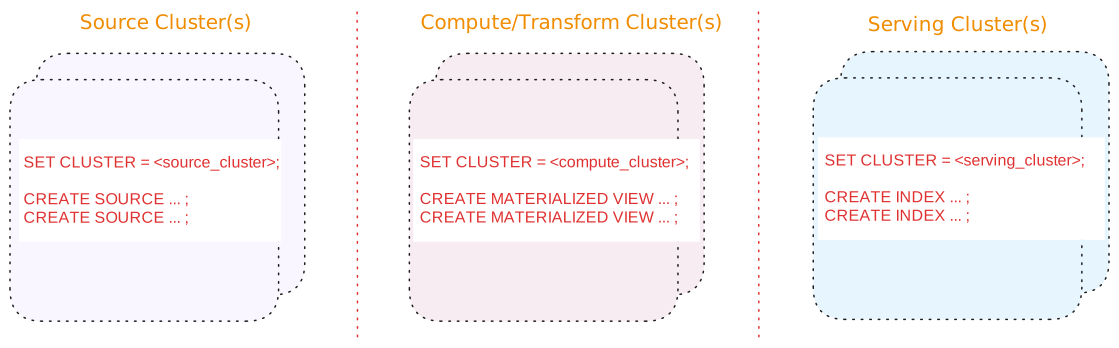
A three-tier architecture consists of:
| Tier | Description |
| --- | --- |
| Source cluster(s) | A dedicated cluster(s) for sources.
In addition, for upsert sources:
-
Consider separating upsert sources from your other sources. Upsert sources have higher resource requirements (since, for upsert sources, Materialize maintains each key and associated last value for the key as well as to perform deduplication). As such, if possible, use a separate source cluster for upsert sources.
-
Consider using a larger cluster size during snapshotting for upsert sources. Once the snapshotting operation is complete, you can downsize the cluster to align with the steady-state ingestion.
|
| Compute/Transform cluster(s) | A dedicated cluster(s) for compute/transformation:
-
Materialized views to persist, in durable storage, the results that will be served. Results of materialized views are available across all clusters.
> **Tip:** If you are using stacked views (i.e., views whose definition depends > on other views) to reduce SQL complexity, generally, only the topmost > view (i.e., the view whose results will be served) should be a > materialized view. The underlying views that do not serve results do not > need to be materialized. -
Indexes, only as needed, to make transformation fast (such as possibly indexes on join keys).
> **Tip:** From the compute/transformation clusters, do not create indexes on the > materialized views for the purposes of serving the view results. > Instead, use the [serving cluster(s)](#tier-serving-clusters) when > creating indexes to serve the results.
|
| Serving cluster(s) | A dedicated cluster(s) for serving queries, including indexes on the materialized views. Indexes are local to the cluster in which they are created. |
Benefits of a three-tier architecture include:
See also [Operational guidelines](/manage/operational-guidelines/).
#### Alternatives
Alternatively, if a three-tier architecture is not feasible or unnecessary due
to low volume or a non-production setup, a two cluster or a single cluster
architecture may suffice.
See [Appendix: Alternative cluster
architectures](/manage/appendix-alternative-cluster-architectures/) for details.
### Use production clusters for production workloads only
Use production cluster(s) for production workloads only. That is, avoid using
production cluster(s) to run development workloads or non-production tasks.
### Consider hydration requirements
During hydration, materialized views require memory proportional to both the
input and output. When estimating required resources, consider both the
hydration cost and the steady-state cost.
## Related pages
- [`CREATE CLUSTER`](/sql/create-cluster)
- [`ALTER CLUSTER`](/sql/alter-cluster)
- [System clusters](/sql/system-clusters)
- [Usage & billing](/administration/billing/)
- [Operational guidelines](/manage/operational-guidelines/)