Authentication
View as MarkdownConfiguring Authentication Type
To configure the authentication type used by Self-Managed Materialize, use the
spec.authenticatorKind setting in conjunction with any specific configuration
for the authentication method.
The spec.authenticatorKind setting determines which authentication method is
used:
| authenticatorKind Value | Description |
|---|---|
| None | Disables authentication. All users are trusted based on their claimed identity without any verification. Default |
| SASL/SCRAM |
Enables:
When enabled, users must authenticate with their password. Passwords are automatically stored in SCRAM-SHA-256 format in the database.
💡 Tip: When enabled, you must also set the
mz_system user password in
external_login_password_mz_system. See Configuring SASL/SCRAM
authentication for details.
|
| Password |
Enables password authentication for users. When enabled, users must authenticate with their password.
💡 Tip: When enabled, you must also set the
mz_system user password in
external_login_password_mz_system. See Configuring password
authentication for details.
|
authenticatorKind field is set for any future version upgrades or rollouts of the Materialize CR. Having it undefined will reset authenticationKind to None.
Configuring SASL/SCRAM authentication
v26.0.0 or later.
SASL authentication requires users to log in with a password. Passwords are automatically stored in SCRAM-SHA-256 format in the database.
When SASL authentication is enabled:
- PostgreSQL connections (e.g.,
psql, client libraries, connection poolers) use SCRAM-SHA-256 authentication. - HTTP/Web Console connections use standard password authentication.
This hybrid approach provides maximum security for SQL connections while maintaining compatibility with web-based tools.
To configure Self-Managed Materialize for SASL/SCRAM authentication, update the following fields:
| Resource | Configuration | Description |
|---|---|---|
| Materialize CR | spec.authenticatorKind |
Set to Sasl to enable SASL/SCRAM-SHA-256 authentication for PostgreSQL connections. |
| Kubernetes Secret | external_login_password_mz_system |
Specify the password for the mz_system user, who is the only user initially available. Add external_login_password_mz_system to the Kubernetes Secret referenced in the Materialize CR’s spec.backendSecretName field. |
The following example Kubernetes manifest includes configuration for SASL/SCRAM-SHA-256 authentication:
apiVersion: v1
kind: Namespace
metadata:
  name: materialize-environment
---
apiVersion: v1
kind: Secret
metadata:
  name: materialize-backend
  namespace: materialize-environment
stringData:
  metadata_backend_url: "..."
  persist_backend_url: "..."
  license_key: "..."
  external_login_password_mz_system: "enter_mz_system_password"
---
apiVersion: materialize.cloud/v1alpha1
kind: Materialize
metadata:
  name: 12345678-1234-1234-1234-123456789012
  namespace: materialize-environment
spec:
  environmentdImageRef: materialize/environmentd:v26.12.1
  backendSecretName: materialize-backend
  authenticatorKind: Sasl
authenticatorKind field is set for any future version upgrades or rollouts of the Materialize CR. Having it undefined will reset authenticationKind to None.
Configuring password authentication
Password authentication requires users to log in with a password.
To configure Self-Managed Materialize for password authentication, update the following fields:
| Resource | Configuration | Description |
|---|---|---|
| Materialize CR | spec.authenticatorKind |
Set to Password to enable password authentication. |
| Kubernetes Secret | external_login_password_mz_system |
Specify the password for the mz_system user, who is the only user initially available. Add external_login_password_mz_system to the Kubernetes Secret referenced in the Materialize CR’s spec.backendSecretName field. |
The following example Kubernetes manifest includes configuration for password authentication:
apiVersion: v1
kind: Namespace
metadata:
  name: materialize-environment
---
apiVersion: v1
kind: Secret
metadata:
  name: materialize-backend
  namespace: materialize-environment
stringData:
  metadata_backend_url: "..."
  persist_backend_url: "..."
  license_key: "..."
  external_login_password_mz_system: "enter_mz_system_password"
---
apiVersion: materialize.cloud/v1alpha1
kind: Materialize
metadata:
  name: 12345678-1234-1234-1234-123456789012
  namespace: materialize-environment
spec:
  environmentdImageRef: materialize/environmentd:v26.12.1
  backendSecretName: materialize-backend
  authenticatorKind: Password
authenticatorKind field is set for any future version upgrades or rollouts of the Materialize CR. Having it undefined will reset authenticationKind to None.
Logging in and creating users
When authentication is enabled, only the mz_system user is initially
available. To create additional users:
-
Login as the
mz_systemuser, using theexternal_login_password_mz_systempassword.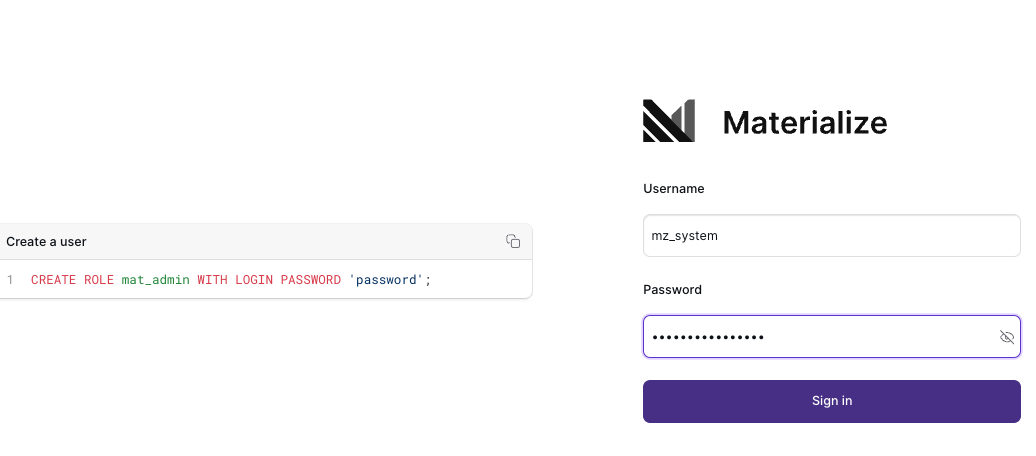
-
Use
CREATE ROLE ... WITH LOGIN PASSWORD ...to create new users:CREATE ROLE <user> WITH LOGIN PASSWORD '<password>'; -
Log out as
mz_systemuser.! Important: In general, other than the initial login to create new users, avoid usingmz_systemsincemz_systemalso used by the Materialize Operator for upgrades and maintenance tasks. -
Login as one of the created users.
RBAC
For details on role-based access control (RBAC), including enabling RBAC, see Access Control.
See also
- For all Materialize CR settings, see Materialize CRD Field Descriptions.